
Settings · controls and screen
Consult each Configuration field, button and tab, with system screenshots and explanation of their effects.
Reviewed October 23, 2026 · Customer guide
Navigation was checked and controls were checked against the panel code. Save, import, delete, and activate operations were not run on production data for this screenshot.
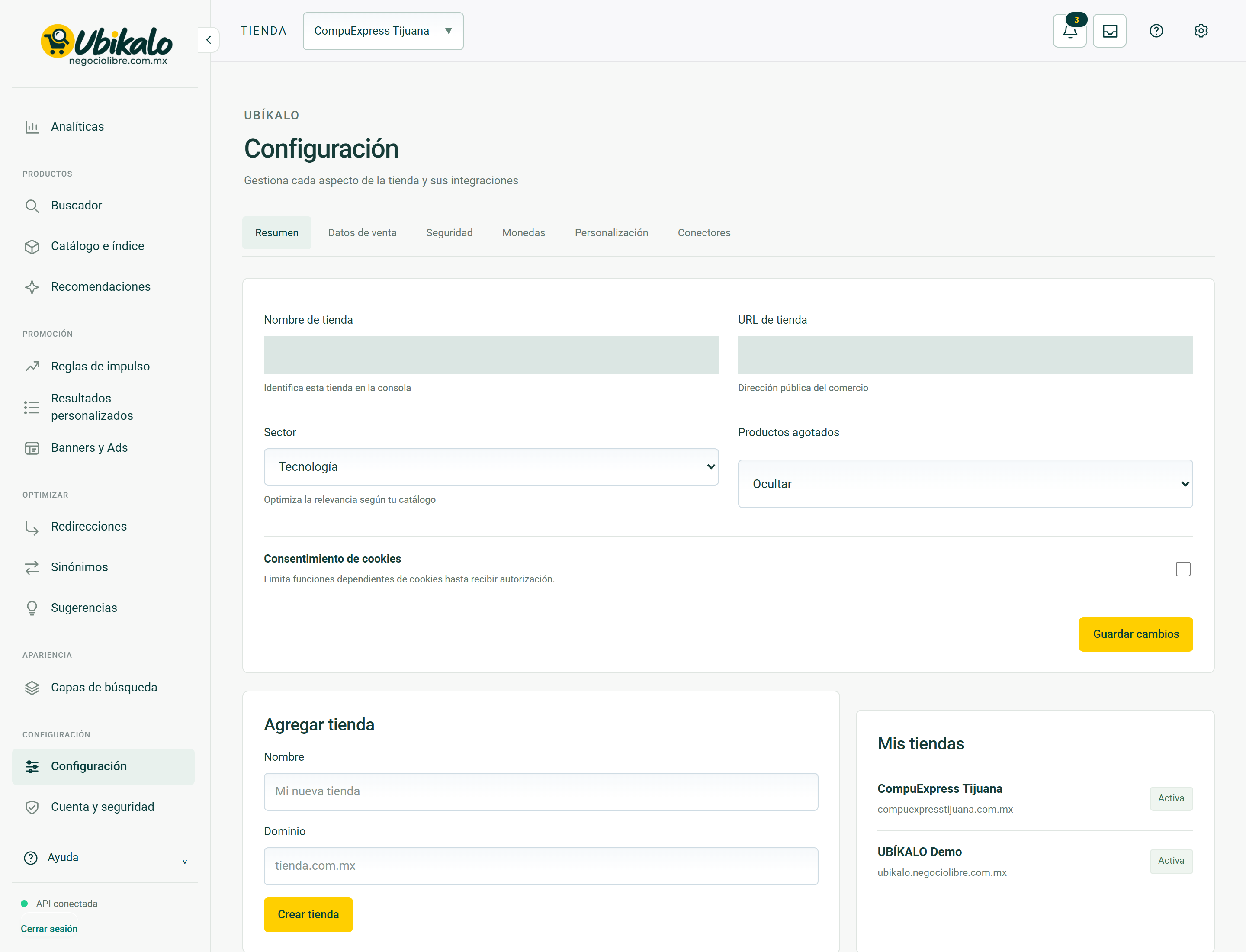
Control by control
| Control | How to use | Effect |
|---|---|---|
| 1Select storeselect | Change the store or active site. Check this selector before saving, importing, or syncing. | data entryLocated in the actual interface |
| 2Notifications: 3 unreadbutton | Opens account context notices and its unread counter. A historical warning does not confirm a current failure. | ReadingLocated in the actual interface |
| 3inboxbutton | Open the account’s messages and notifications inbox. | NavigationLocated in the actual interface |
| 4MY ACCOUNT ↗to | Open account, sites or subscription management; It is not the editor of the search engine. | NavigationLocated in the actual interface |
| 5Activate dark modebutton | Toggle the visual theme and retain the browser preference. It does not modify content or commercial data. | Local preferenceLocated in the actual interface |
| 6Open administration panelto | Open global administration; requires explicit permission from NegocioLibre. | Browsing with permissionLocated in the actual interface |
| 7Summarybutton | Open the “Summary” section of the dashboard. Switching views is not a substitute for saving a pending form. | NavigationLocated in the actual interface |
| 8Sales databutton | Open the “Sales Data” section of the dashboard. Switching views is not a substitute for saving a pending form. | NavigationLocated in the actual interface |
| 9Securitybutton | Open the “Security” section of the panel. Switching views is not a substitute for saving a pending form. | NavigationLocated in the actual interface |
| 10Coinsbutton | Open the “Currencies” section of the panel. Switching views is not a substitute for saving a pending form. | NavigationLocated in the actual interface |
| 11Personalizationbutton | Open the “Personalization” section of the panel. Switching views is not a substitute for saving a pending form. | NavigationLocated in the actual interface |
| 12Connectorsbutton | Open the “Connectors” section of the panel. Switching views is not a substitute for saving a pending form. | NavigationLocated in the actual interface |
| 13Store Name Identifies this store in the consolefield | Administrative name of the selected store. | data entryLocated in the actual interface |
| 14Store URL Public address of the businessurl | Public URL of the business. It must correspond to this store and use the correct domain. | data entryLocated in the actual interface |
| 15Sector Technology Fashion Home Health and beauty Automotive General commerce Optimize relevance based on your catalogselect | Store sector; It does not replace categories or product data. | data entryLocated in the actual interface |
| 16Out of stock products Hide Showselect | Choose to show or hide out of stock products in the results. | data entryLocated in the actual interface |
| 17Cookie Consent Limit cookie-dependent functions until authorized.checkbox | Control of consent-dependent functions. Validate the integration with your consent manager. | Selection; requires saving according to the formLocated in the actual interface |
| 18Save changesbutton | Submit the form fields in this section. Review the data and context before confirming. A validation error requires correcting the fields; a conflict notice requires reloading. | Persistent changeLocated; not run in production |
| 19Namefield | Name that identifies this registry or business. In rules and campaigns it is an administrative reference; in business data identifies the company. | data entryLocated in the actual interface |
| 20Domainfield | Domain of the new site or store; Do not reuse another client’s. | data entryLocated in the actual interface |
| 21Create storebutton | Submit the form fields in this section. Review the data and context before confirming. A validation error requires correcting the fields; a conflict notice requires reloading. | Persistent changeLocated; not run in production |
Settings Summary 21 controls
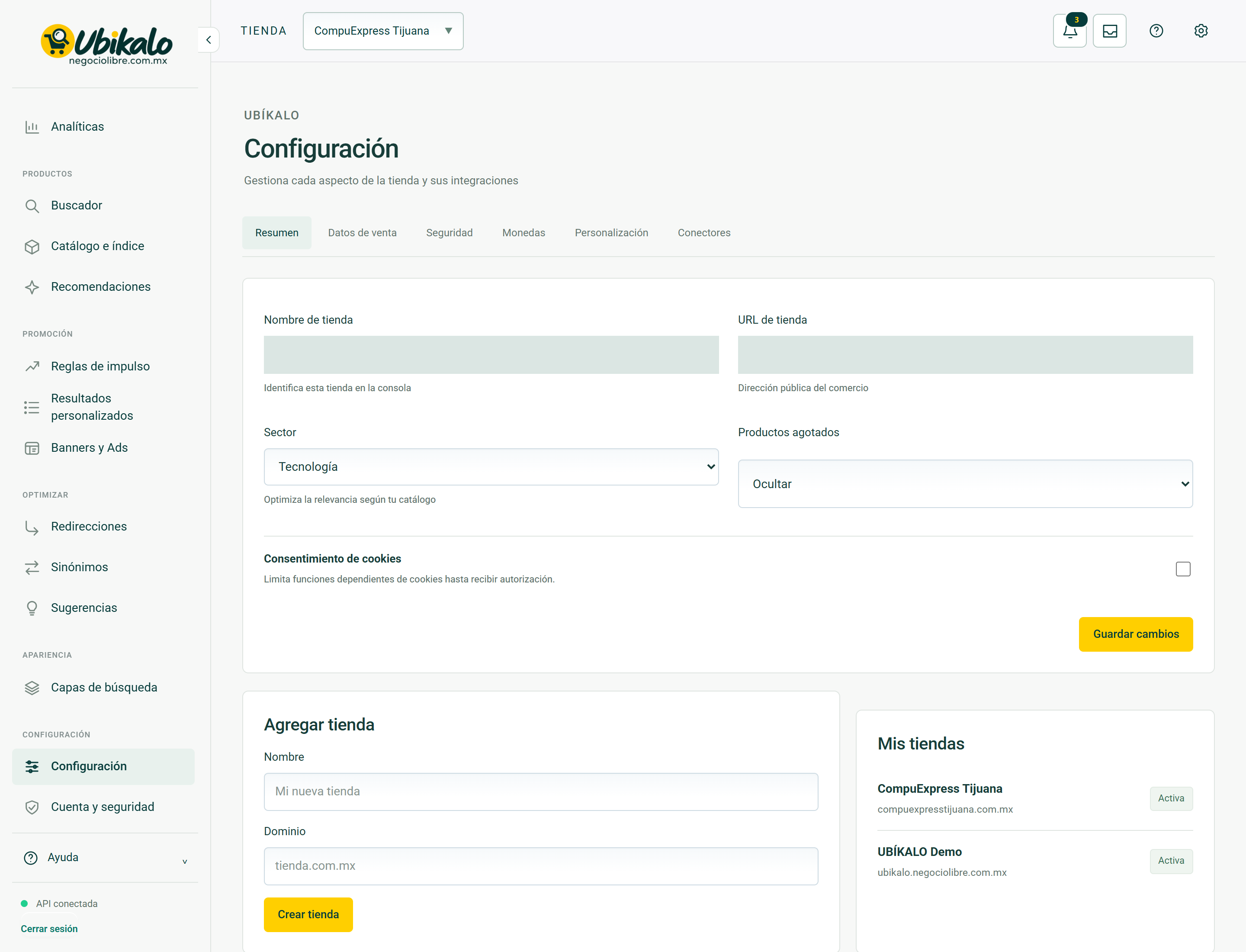
| Control | How to use | Effect |
|---|---|---|
| 1Select storeselect | Change the store or active site. Check this selector before saving, importing, or syncing. | data entryLocated in the actual interface |
| 2Notifications: 3 unreadbutton | Opens account context notices and its unread counter. A historical warning does not confirm a current failure. | ReadingLocated in the actual interface |
| 3inboxbutton | Open the account’s messages and notifications inbox. | NavigationLocated in the actual interface |
| 4MY ACCOUNT ↗to | Open account, sites or subscription management; It is not the editor of the search engine. | NavigationLocated in the actual interface |
| 5Activate dark modebutton | Toggle the visual theme and retain the browser preference. It does not modify content or commercial data. | Local preferenceLocated in the actual interface |
| 6Open administration panelto | Open global administration; requires explicit permission from NegocioLibre. | Browsing with permissionLocated in the actual interface |
| 7Summarybutton | Open the “Summary” section of the dashboard. Switching views is not a substitute for saving a pending form. | NavigationLocated in the actual interface |
| 8Sales databutton | Open the “Sales Data” section of the dashboard. Switching views is not a substitute for saving a pending form. | NavigationLocated in the actual interface |
| 9Securitybutton | Open the “Security” section of the panel. Switching views is not a substitute for saving a pending form. | NavigationLocated in the actual interface |
| 10Coinsbutton | Open the “Currencies” section of the panel. Switching views is not a substitute for saving a pending form. | NavigationLocated in the actual interface |
| 11Personalizationbutton | Open the “Personalization” section of the panel. Switching views is not a substitute for saving a pending form. | NavigationLocated in the actual interface |
| 12Connectorsbutton | Open the “Connectors” section of the panel. Switching views is not a substitute for saving a pending form. | NavigationLocated in the actual interface |
| 13Store Name Identifies this store in the consolefield | Administrative name of the selected store. | data entryLocated in the actual interface |
| 14Store URL Public address of the businessurl | Public URL of the business. It must correspond to this store and use the correct domain. | data entryLocated in the actual interface |
| 15Sector Technology Fashion Home Health and beauty Automotive General commerce Optimize relevance based on your catalogselect | Store sector; It does not replace categories or product data. | data entryLocated in the actual interface |
| 16Out of stock products Hide Showselect | Choose to show or hide out of stock products in the results. | data entryLocated in the actual interface |
| 17Cookie Consent Limit cookie-dependent functions until authorized.checkbox | Control of consent-dependent functions. Validate the integration with your consent manager. | Selection; requires saving according to the formLocated in the actual interface |
| 18Save changesbutton | Submit the form fields in this section. Review the data and context before confirming. A validation error requires correcting the fields; a conflict notice requires reloading. | Persistent changeLocated; not run in production |
| 19Namefield | Name that identifies this registry or business. In rules and campaigns it is an administrative reference; in business data identifies the company. | data entryLocated in the actual interface |
| 20Domainfield | Domain of the new site or store; Do not reuse another client’s. | data entryLocated in the actual interface |
| 21Create storebutton | Submit the form fields in this section. Review the data and context before confirming. A validation error requires correcting the fields; a conflict notice requires reloading. | Persistent changeLocated; not run in production |
Configuration · Sales data 12 controls
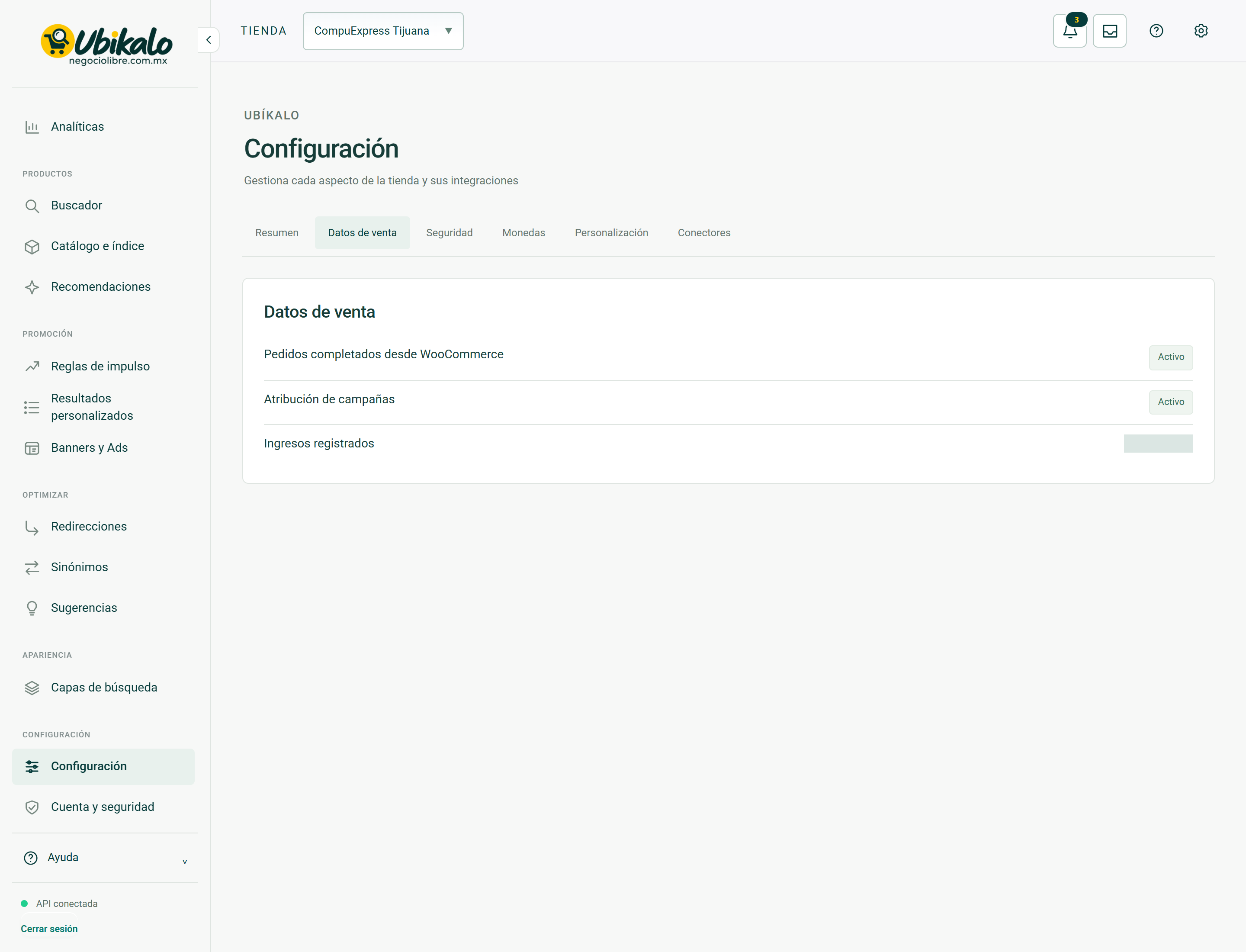
| Control | How to use | Effect |
|---|---|---|
| 1Select storeselect | Change the store or active site. Check this selector before saving, importing, or syncing. | data entryLocated in the actual interface |
| 2Notifications: 3 unreadbutton | Opens account context notices and its unread counter. A historical warning does not confirm a current failure. | ReadingLocated in the actual interface |
| 3inboxbutton | Open the account’s messages and notifications inbox. | NavigationLocated in the actual interface |
| 4MY ACCOUNT ↗to | Open account, sites or subscription management; It is not the editor of the search engine. | NavigationLocated in the actual interface |
| 5Activate dark modebutton | Toggle the visual theme and retain the browser preference. It does not modify content or commercial data. | Local preferenceLocated in the actual interface |
| 6Open administration panelto | Open global administration; requires explicit permission from NegocioLibre. | Browsing with permissionLocated in the actual interface |
| 7Summarybutton | Open the “Summary” section of the dashboard. Switching views is not a substitute for saving a pending form. | NavigationLocated in the actual interface |
| 8Sales databutton | Open the “Sales Data” section of the dashboard. Switching views is not a substitute for saving a pending form. | NavigationLocated in the actual interface |
| 9Securitybutton | Open the “Security” section of the panel. Switching views is not a substitute for saving a pending form. | NavigationLocated in the actual interface |
| 10Coinsbutton | Open the “Currencies” section of the panel. Switching views is not a substitute for saving a pending form. | NavigationLocated in the actual interface |
| 11Personalizationbutton | Open the “Personalization” section of the panel. Switching views is not a substitute for saving a pending form. | NavigationLocated in the actual interface |
| 12Connectorsbutton | Open the “Connectors” section of the panel. Switching views is not a substitute for saving a pending form. | NavigationLocated in the actual interface |
Settings Security 13 controls
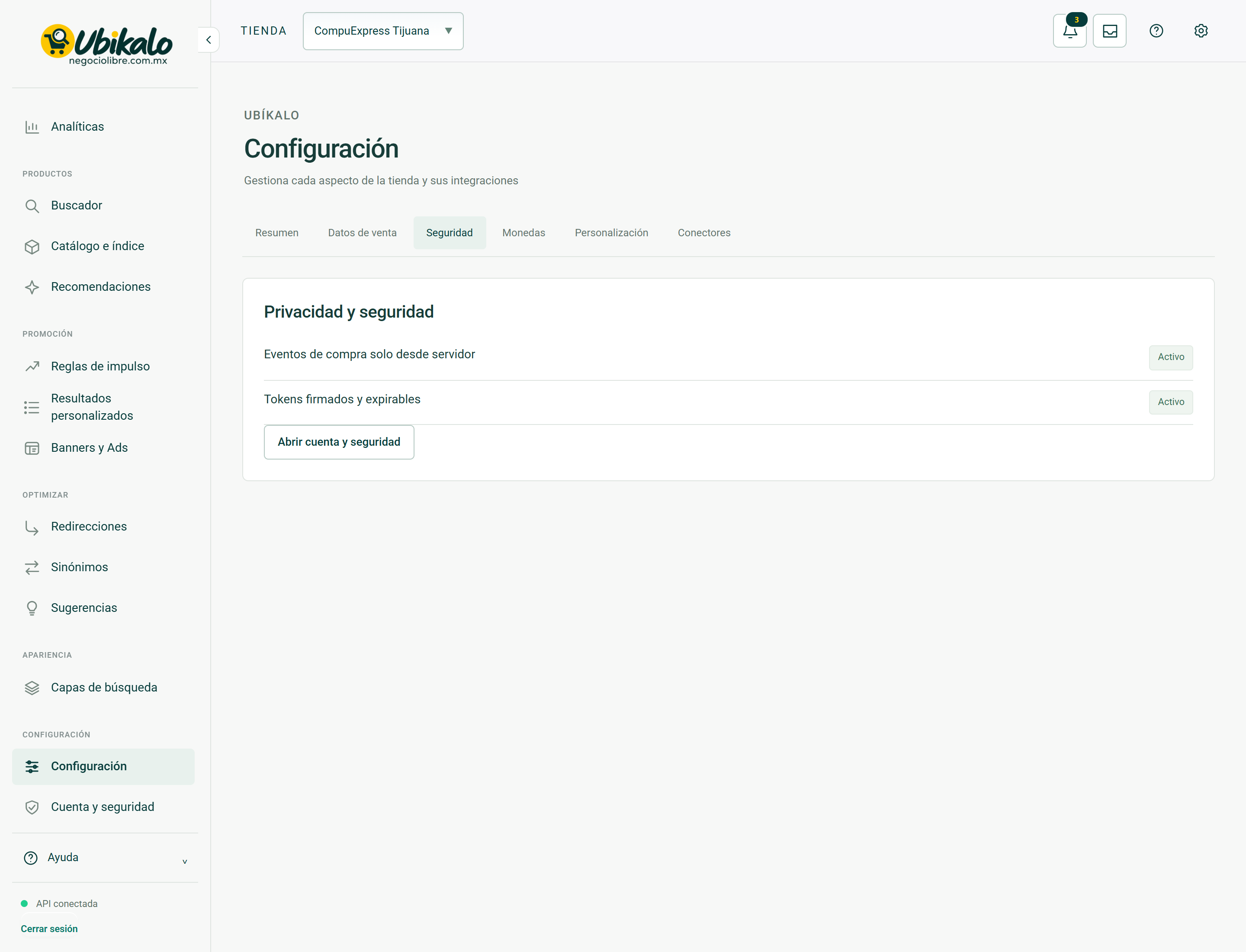
| Control | How to use | Effect |
|---|---|---|
| 1Select storeselect | Change the store or active site. Check this selector before saving, importing, or syncing. | data entryLocated in the actual interface |
| 2Notifications: 3 unreadbutton | Opens account context notices and its unread counter. A historical warning does not confirm a current failure. | ReadingLocated in the actual interface |
| 3inboxbutton | Open the account’s messages and notifications inbox. | NavigationLocated in the actual interface |
| 4MY ACCOUNT ↗to | Open account, sites or subscription management; It is not the editor of the search engine. | NavigationLocated in the actual interface |
| 5Activate dark modebutton | Toggle the visual theme and retain the browser preference. It does not modify content or commercial data. | Local preferenceLocated in the actual interface |
| 6Open administration panelto | Open global administration; requires explicit permission from NegocioLibre. | Browsing with permissionLocated in the actual interface |
| 7Summarybutton | Open the “Summary” section of the dashboard. Switching views is not a substitute for saving a pending form. | NavigationLocated in the actual interface |
| 8Sales databutton | Open the “Sales Data” section of the dashboard. Switching views is not a substitute for saving a pending form. | NavigationLocated in the actual interface |
| 9Securitybutton | Open the “Security” section of the panel. Switching views is not a substitute for saving a pending form. | NavigationLocated in the actual interface |
| 10Coinsbutton | Open the “Currencies” section of the panel. Switching views is not a substitute for saving a pending form. | NavigationLocated in the actual interface |
| 11Personalizationbutton | Open the “Personalization” section of the panel. Switching views is not a substitute for saving a pending form. | NavigationLocated in the actual interface |
| 12Connectorsbutton | Open the “Connectors” section of the panel. Switching views is not a substitute for saving a pending form. | NavigationLocated in the actual interface |
| 13Open account and securitybutton | Open the “Open account and security” section of the dashboard. Switching views is not a substitute for saving a pending form. | NavigationLocated in the actual interface |
Settings Currencies 15 controls
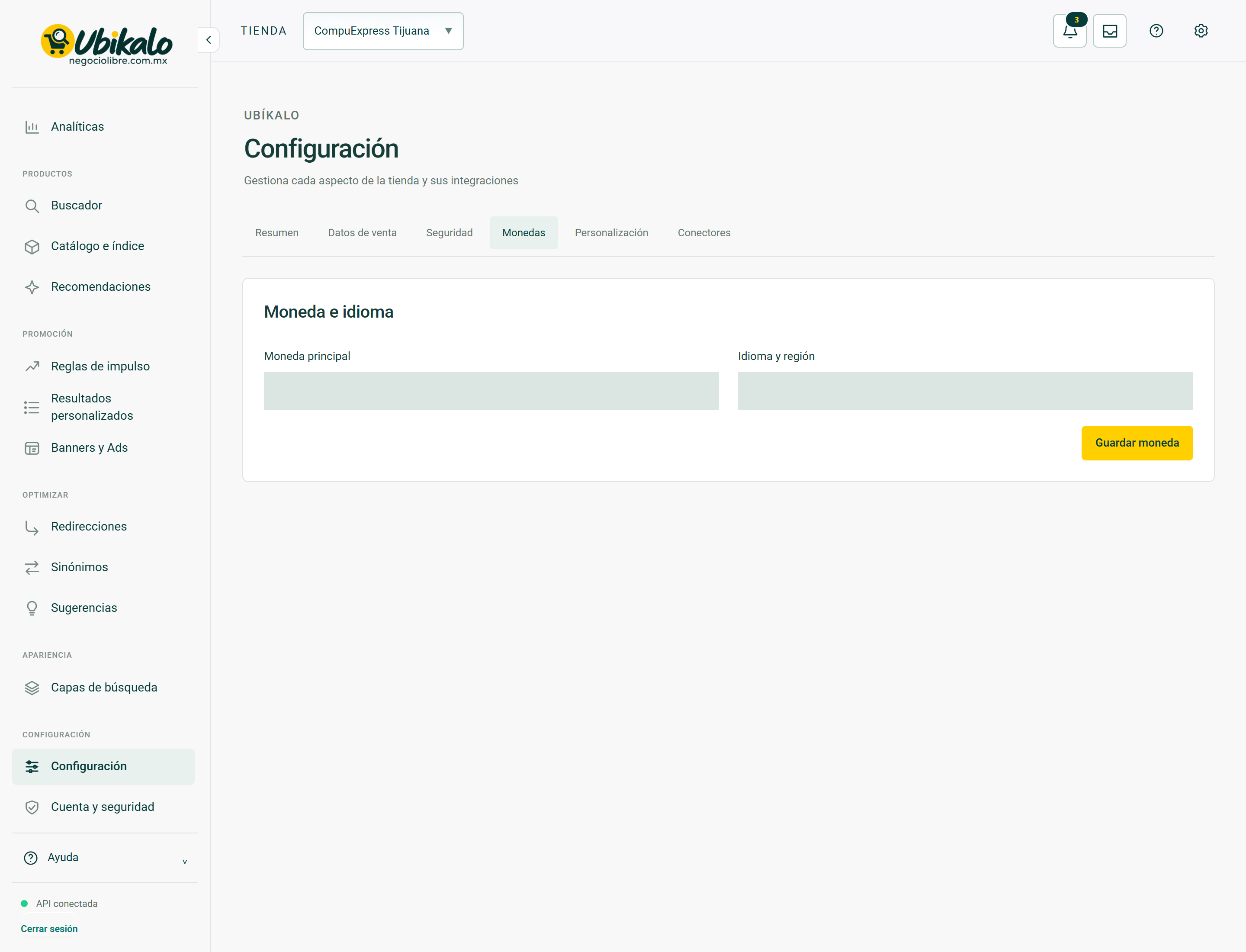
| Control | How to use | Effect |
|---|---|---|
| 1Select storeselect | Change the store or active site. Check this selector before saving, importing, or syncing. | data entryLocated in the actual interface |
| 2Notifications: 3 unreadbutton | Opens account context notices and its unread counter. A historical warning does not confirm a current failure. | ReadingLocated in the actual interface |
| 3inboxbutton | Open the account’s messages and notifications inbox. | NavigationLocated in the actual interface |
| 4MY ACCOUNT ↗to | Open account, sites or subscription management; It is not the editor of the search engine. | NavigationLocated in the actual interface |
| 5Activate dark modebutton | Toggle the visual theme and retain the browser preference. It does not modify content or commercial data. | Local preferenceLocated in the actual interface |
| 6Open administration panelto | Open global administration; requires explicit permission from NegocioLibre. | Browsing with permissionLocated in the actual interface |
| 7Summarybutton | Open the “Summary” section of the dashboard. Switching views is not a substitute for saving a pending form. | NavigationLocated in the actual interface |
| 8Sales databutton | Open the “Sales Data” section of the dashboard. Switching views is not a substitute for saving a pending form. | NavigationLocated in the actual interface |
| 9Securitybutton | Open the “Security” section of the panel. Switching views is not a substitute for saving a pending form. | NavigationLocated in the actual interface |
| 10Coinsbutton | Open the “Currencies” section of the panel. Switching views is not a substitute for saving a pending form. | NavigationLocated in the actual interface |
| 11Personalizationbutton | Open the “Personalization” section of the panel. Switching views is not a substitute for saving a pending form. | NavigationLocated in the actual interface |
| 12Connectorsbutton | Open the “Connectors” section of the panel. Switching views is not a substitute for saving a pending form. | NavigationLocated in the actual interface |
| 13Main currencyfield | Main currency code. It does not automatically convert amounts or create regional prices. | data entryLocated in the actual interface |
| 14Language and regionfield | Language and region used for presentation. It does not translate the entire catalog by itself. | data entryLocated in the actual interface |
| 15Save currencybutton | Submit the form fields in this section. Review the data and context before confirming. A validation error requires correcting the fields; a conflict notice requires reloading. | Persistent changeLocated; not run in production |
Settings Personalization 30 controls
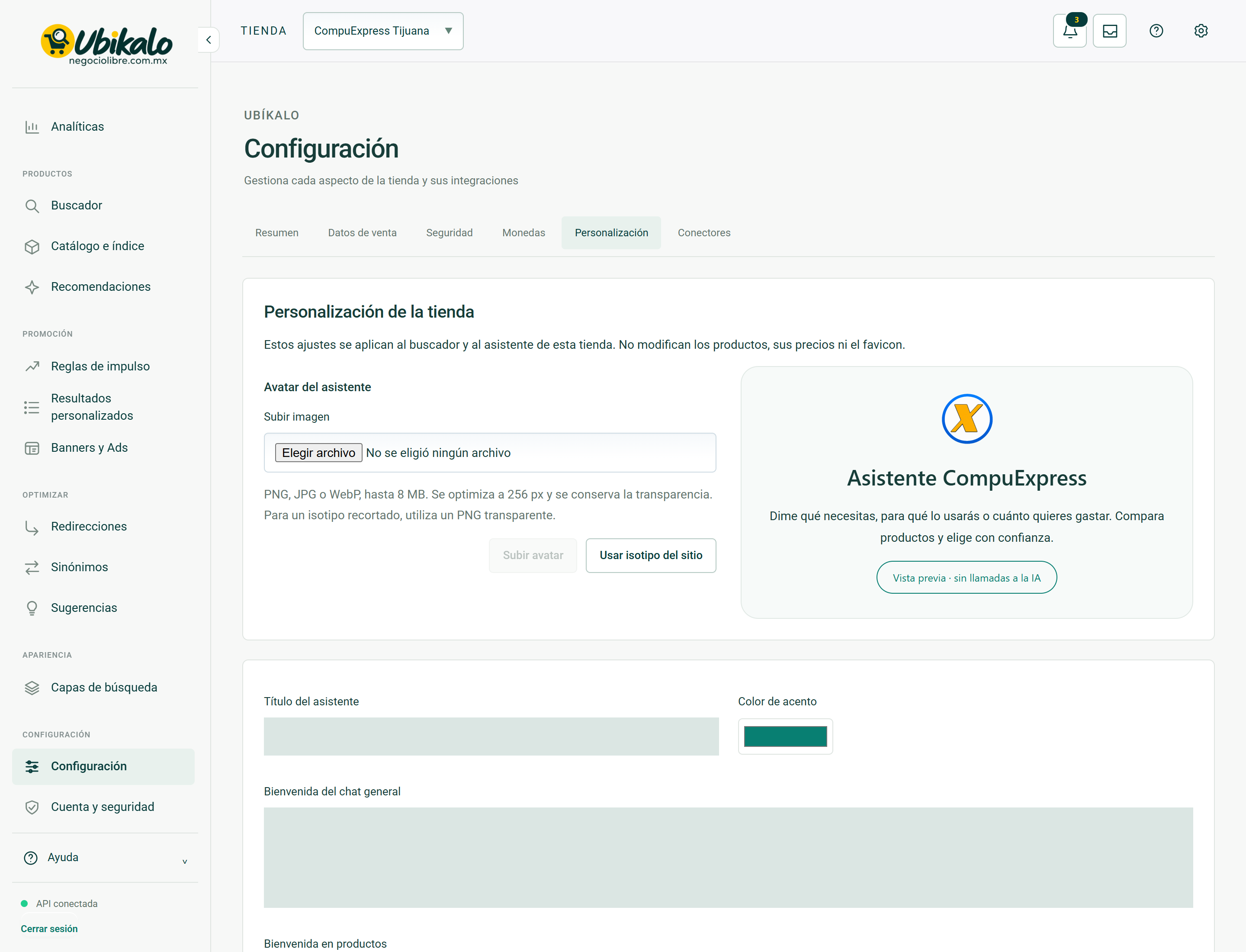
| Control | How to use | Effect |
|---|---|---|
| 1Select storeselect | Change the store or active site. Check this selector before saving, importing, or syncing. | data entryLocated in the actual interface |
| 2Notifications: 3 unreadbutton | Opens account context notices and its unread counter. A historical warning does not confirm a current failure. | ReadingLocated in the actual interface |
| 3inboxbutton | Open the account’s messages and notifications inbox. | NavigationLocated in the actual interface |
| 4MY ACCOUNT ↗to | Open account, sites or subscription management; It is not the editor of the search engine. | NavigationLocated in the actual interface |
| 5Activate dark modebutton | Toggle the visual theme and retain the browser preference. It does not modify content or commercial data. | Local preferenceLocated in the actual interface |
| 6Open administration panelto | Open global administration; requires explicit permission from NegocioLibre. | Browsing with permissionLocated in the actual interface |
| 7Summarybutton | Open the “Summary” section of the dashboard. Switching views is not a substitute for saving a pending form. | NavigationLocated in the actual interface |
| 8Sales databutton | Open the “Sales Data” section of the dashboard. Switching views is not a substitute for saving a pending form. | NavigationLocated in the actual interface |
| 9Securitybutton | Open the “Security” section of the panel. Switching views is not a substitute for saving a pending form. | NavigationLocated in the actual interface |
| 10Coinsbutton | Open the “Currencies” section of the panel. Switching views is not a substitute for saving a pending form. | NavigationLocated in the actual interface |
| 11Personalizationbutton | Open the “Personalization” section of the panel. Switching views is not a substitute for saving a pending form. | NavigationLocated in the actual interface |
| 12Connectorsbutton | Open the “Connectors” section of the panel. Switching views is not a substitute for saving a pending form. | NavigationLocated in the actual interface |
| 13Upload imagefiles | Assistant visual resource. It is not equivalent to a source of knowledge. | data entryLocated in the actual interface |
| 14Upload avatarbutton | Process and save the chosen image as an avatar. Please check the file and form revision before submitting. | Persistent changeLocated; not run in production |
| 15Use site isotypebutton | Resets the isotype configured as avatar. It is an independent operation from the rest of the form. | Persistent changeLocated; not run in production |
| 16Assistant Titlefield | Visible text that heads the component. Use a short, descriptive title. | data entryLocated in the actual interface |
| 17Accent colorcolor | Choose the color of the indicated element; check contrast and save the form. | data entryLocated in the actual interface |
| 18General chat welcometextarea | Welcome from the general assistant; It does not alter products or the AI budget. | data entryLocated in the actual interface |
| 19Welcome on productstextarea | Welcome to the query within the product sheet. | data entryLocated in the actual interface |
| 20Avatar shape Original · retain clipping and transparency Circular Rounded squareselect | Visual form of the avatar. Original retains clipping and transparency; Other options apply a mask. | data entryLocated in the actual interface |
| 21Manrope Typography System Fontselect | Font family of the presentation. Check readability on the topic of commerce. | data entryLocated in the actual interface |
| 22Columns on desktop 3 · large tabs 4 · compact catalog It adapts automatically on small screens.select | Number of columns on desktop. On mobile the layer adapts the distribution. | data entryLocated in the actual interface |
| 23Switch within the search enginecheckbox | Visual control of access to the wizard within the layer; It does not configure provider keys or rates. | Selection; requires saving according to the formLocated in the actual interface |
| 24Consult in product pages and productscheckbox | Visual control of consultation access to product sheets. | Selection; requires saving according to the formLocated in the actual interface |
| 25Price rangecheckbox | Show or hide the “Price Range” filter on the layout. Save the customization and check the public layer. | Selection; requires savingLocated in the actual interface |
| 26Categoriescheckbox | Show or hide the “Categories” filter on the layout. Save the customization and check the public layer. | Selection; requires savingLocated in the actual interface |
| 27Brandscheckbox | Show or hide the “Brands” filter on the presentation. Save the customization and check the public layer. | Selection; requires savingLocated in the actual interface |
| 28Features and labelscheckbox | Show or hide the “Features and Tags” filter on the layout. Save the customization and check the public layer. | Selection; requires savingLocated in the actual interface |
| 29Only availablecheckbox | Show or hide the “Only available” filter on the presentation. Save the customization and check the public layer. | Selection; requires savingLocated in the actual interface |
| 30Save customizationbutton | Submit the form fields in this section. Review the data and context before confirming. A validation error requires correcting the fields; a conflict notice requires reloading. | Persistent changeLocated; not run in production |
Configuration · Connectors 27 controls
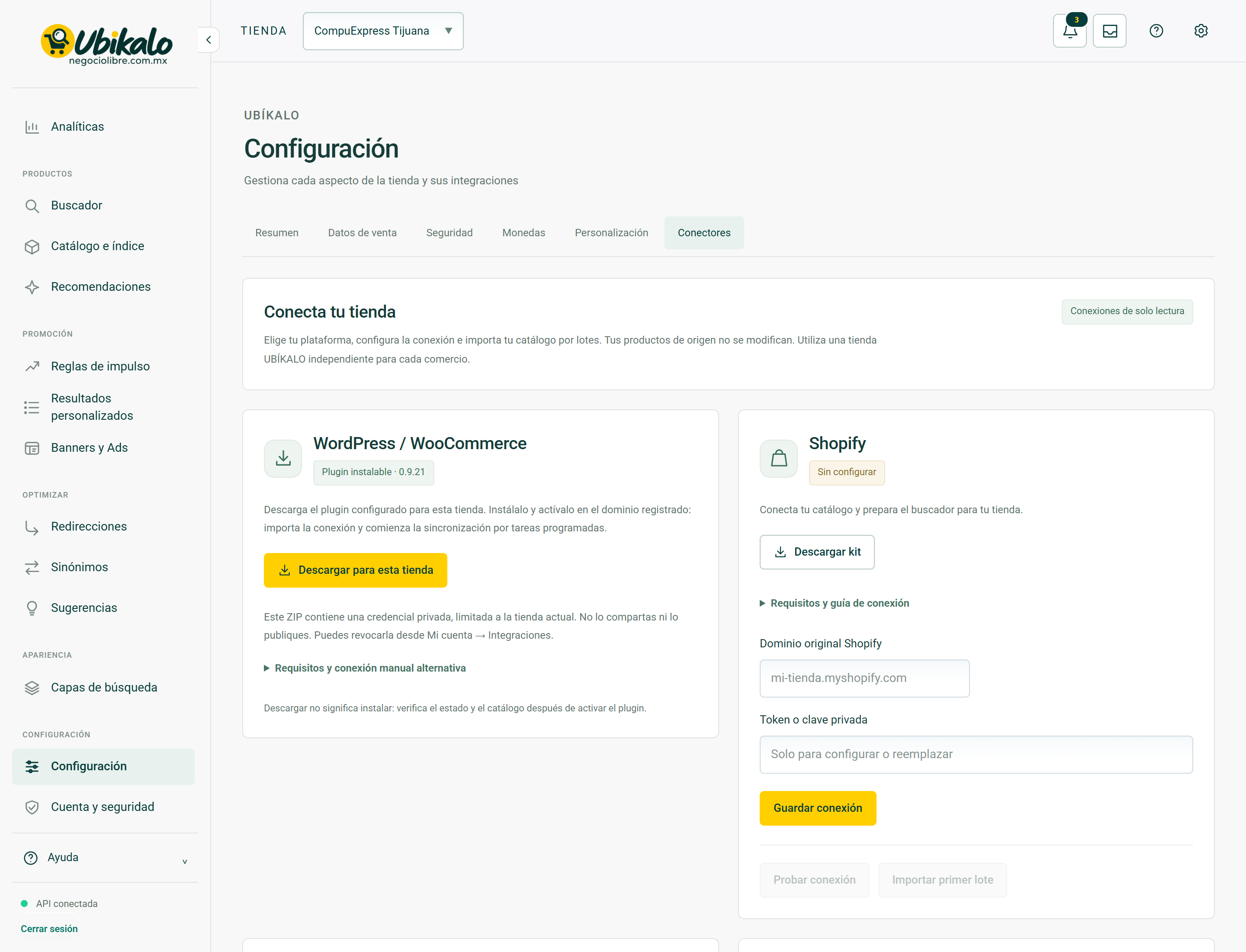
| Control | How to use | Effect |
|---|---|---|
| 1Select storeselect | Change the store or active site. Check this selector before saving, importing, or syncing. | data entryLocated in the actual interface |
| 2Notifications: 3 unreadbutton | Opens account context notices and its unread counter. A historical warning does not confirm a current failure. | ReadingLocated in the actual interface |
| 3inboxbutton | Open the account’s messages and notifications inbox. | NavigationLocated in the actual interface |
| 4MY ACCOUNT ↗to | Open account, sites or subscription management; It is not the editor of the search engine. | NavigationLocated in the actual interface |
| 5Activate dark modebutton | Toggle the visual theme and retain the browser preference. It does not modify content or commercial data. | Local preferenceLocated in the actual interface |
| 6Open administration panelto | Open global administration; requires explicit permission from NegocioLibre. | Browsing with permissionLocated in the actual interface |
| 7Summarybutton | Open the “Summary” section of the dashboard. Switching views is not a substitute for saving a pending form. | NavigationLocated in the actual interface |
| 8Sales databutton | Open the “Sales Data” section of the dashboard. Switching views is not a substitute for saving a pending form. | NavigationLocated in the actual interface |
| 9Securitybutton | Open the “Security” section of the panel. Switching views is not a substitute for saving a pending form. | NavigationLocated in the actual interface |
| 10Coinsbutton | Open the “Currencies” section of the panel. Switching views is not a substitute for saving a pending form. | NavigationLocated in the actual interface |
| 11Personalizationbutton | Open the “Personalization” section of the panel. Switching views is not a substitute for saving a pending form. | NavigationLocated in the actual interface |
| 12Connectorsbutton | Open the “Connectors” section of the panel. Switching views is not a substitute for saving a pending form. | NavigationLocated in the actual interface |
| 13Download for this storebutton | Download the indicated resource. Check product, domain and version before installing. | DownloadLocated in the actual interface |
| 14Requirements and alternative manual connectionsummary | Open or close the “Requirements and alternative manual connection” information or form. Does not send your data. | DropdownLocated in the actual interface |
| 15Download kitto | Download the indicated resource. Check product, domain and version before installing. | DownloadLocated in the actual interface |
| 16Requirements and connection guidesummary | Open or close the “Requirements and connection guide” information or form. Does not send your data. | DropdownLocated in the actual interface |
| 17Original domain Shopifyfield | Authorized receiving bank account. Never enter banking credentials. | data entryLocated in the actual interface |
| 18Token or private keypassword | Catalog connector private credential. Just enter it on the authorized administrative form; never in public code or in a capture. | data entryLocated in the actual interface |
| 19Save connectionbutton | Submit the form fields in this section. Review the data and context before confirming. A validation error requires correcting the fields; a conflict notice requires reloading. | Persistent changeLocated; not run in production |
| 20Test connectionbutton | Test authorization and connection with the catalog provider. It doesn’t matter products. Does not publish keys. | External requestLocated in the actual interface |
| 21Import first batchbutton | Imports the indicated batch from the connected catalog. Review domain, limits, and cursor before continuing. | Persistent changeLocated; not run in production |
| 22Store hashfield | Authorized receiving bank account. Never enter banking credentials. | data entryLocated in the actual interface |
| 23Store Root HTTPS URLfield | Authorized receiving bank account. Never enter banking credentials. | data entryLocated in the actual interface |
| 24Catalog Currencyfield | Main currency code. It does not automatically convert amounts or create regional prices. | data entryLocated in the actual interface |
| 25I confirm that this store uses inventory from a single source and that the base price is appropriate for my public catalog.checkbox | Please confirm that the scope of the connector corresponds to the inventory and price of this store. Don’t accept without checking. | Selection; requires saving according to the formLocated in the actual interface |
| 26Store Numeric IDfield | Authorized receiving bank account. Never enter banking credentials. | data entryLocated in the actual interface |
| 27See integration using REST APIsummary | Open or close the “View integration using REST API” information or form. Does not send your data. | DropdownLocated in the actual interface |
Steps
- Select the correct store or site in the header.
- Locate the control by its label in the capture and in the table.
- Check if its effect is read, local selection or persistent change before using it.
Before changing data
Check permissions and context. A snapshot documents the observed interface, it does not guarantee that all states, plans or integrations have the same controls. Hidden fields protect real data; They are not example information.
After using a control
In a save, review the confirmation and consult the data again. In a sync, it checks for completion and a sample of the result. Don’t interpret opening a form or copying code as a completed post.
How to verify it worked
The control produces the documented effect and preserves the correct context data and constraints.