
Analytics · controls and screen
Consult each Analytics field, button and tab, with system screenshots and explanation of their effects.
Reviewed October 23, 2026 · Customer guide
Navigation was checked and controls were checked against the panel code. Save, import, delete, and activate operations were not run on production data for this screenshot.
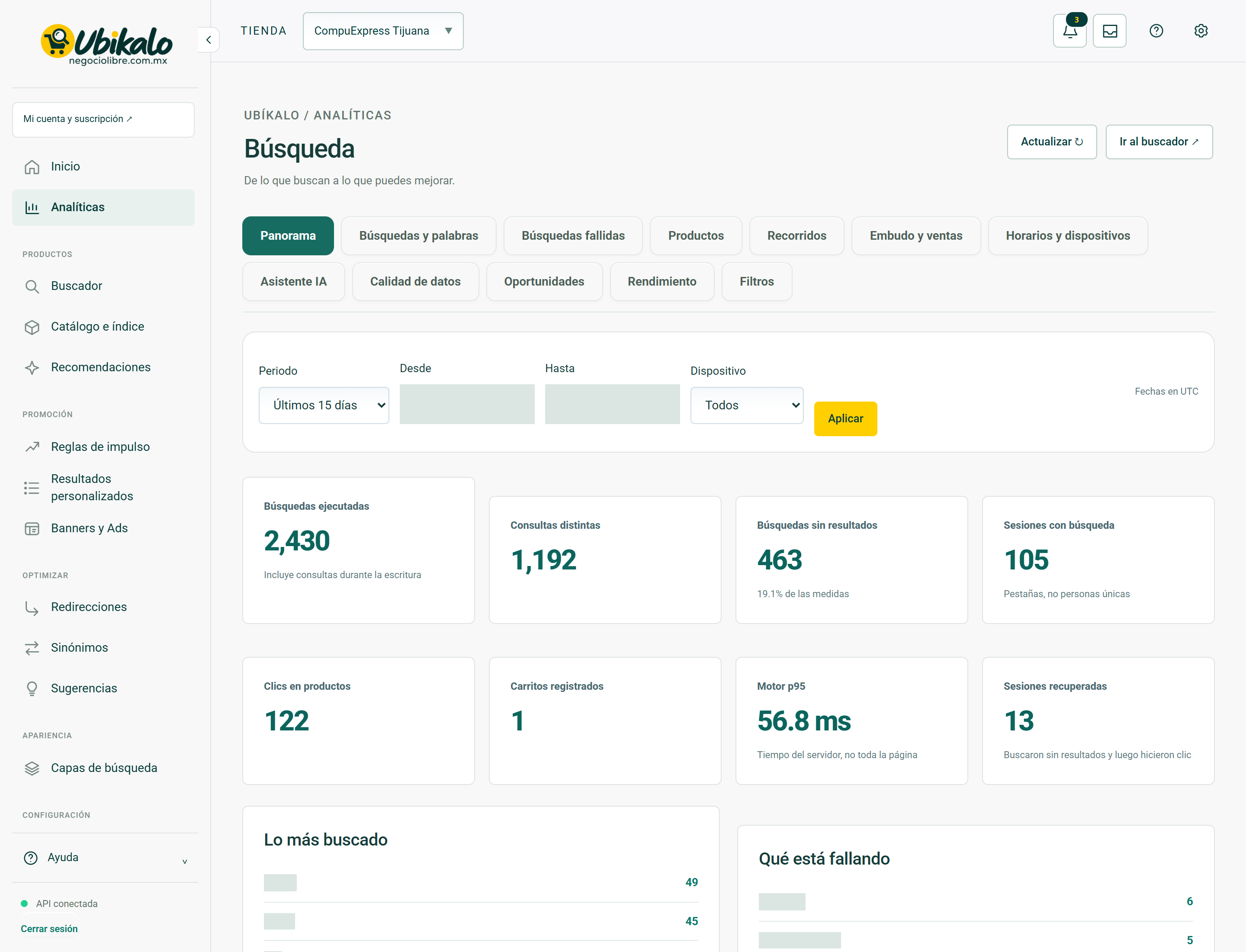
Control by control
| Control | How to use | Effect |
|---|---|---|
| 1Select storeselect | Change the store or active site. Check this selector before saving, importing, or syncing. | data entryLocated in the actual interface |
| 2Notifications: 3 unreadbutton | Opens account context notices and its unread counter. A historical warning does not confirm a current failure. | ReadingLocated in the actual interface |
| 3inboxbutton | Open the account’s messages and notifications inbox. | NavigationLocated in the actual interface |
| 4MY ACCOUNT ↗to | Open account, sites or subscription management; It is not the editor of the search engine. | NavigationLocated in the actual interface |
| 5Activate dark modebutton | Toggle the visual theme and retain the browser preference. It does not modify content or commercial data. | Local preferenceLocated in the actual interface |
| 6Open administration panelto | Open global administration; requires explicit permission from NegocioLibre. | Browsing with permissionLocated in the actual interface |
| 7Update ↻button | Check the displayed data again. It is not a confirmation of sale nor a complete import. | ReadingLocated in the actual interface |
| 8Go to search engine ↗button | Open the search engine space to test real queries. | NavigationLocated in the actual interface |
| 9Panoramabutton | Open the “Panorama” section of the panel. Switching views is not a substitute for saving a pending form. | NavigationLocated in the actual interface |
| 10Searches and wordsbutton | Open the “Searches and words” section of the panel. Switching views is not a substitute for saving a pending form. | NavigationLocated in the actual interface |
| 11Failed searchesbutton | Open the “Failed Searches” section of the dashboard. Switching views is not a substitute for saving a pending form. | NavigationLocated in the actual interface |
| 12Productsbutton | Open the “Products” section of the dashboard. Switching views is not a substitute for saving a pending form. | NavigationLocated in the actual interface |
| 13Toursbutton | Open the “Tours” section of the panel. Switching views is not a substitute for saving a pending form. | NavigationLocated in the actual interface |
| 14Funnel and salesbutton | Open the “Funnel and Sales” section of the dashboard. Switching views is not a substitute for saving a pending form. | NavigationLocated in the actual interface |
| 15Schedules and devicesbutton | Open the “Schedules and Devices” section of the dashboard. Switching views is not a substitute for saving a pending form. | NavigationLocated in the actual interface |
| 16AI Assistantbutton | Open the “AI Assistant” section of the dashboard. Switching views is not a substitute for saving a pending form. | NavigationLocated in the actual interface |
| 17Data qualitybutton | Open the “Data Quality” section of the dashboard. Switching views is not a substitute for saving a pending form. | NavigationLocated in the actual interface |
| 18Opportunitiesbutton | Open the “Opportunities” section of the dashboard. Switching views is not a substitute for saving a pending form. | NavigationLocated in the actual interface |
| 19Performancebutton | Open the “Performance” section of the dashboard. Switching views is not a substitute for saving a pending form. | NavigationLocated in the actual interface |
| 20Filtersbutton | Open the “Filters” section of the panel. Switching views is not a substitute for saving a pending form. | NavigationLocated in the actual interface |
| 21Analytical periodselect | Select the reporting period. Review the resulting dates before comparing metrics. | data entryLocated in the actual interface |
| 22Sincedate | Defines the start date of the report. | data entryLocated in the actual interface |
| 23Untildate | Defines the end date; Please check the time zone indicated. | data entryLocated in the actual interface |
| 24Deviceselect | Limits the report to the selected device; It doesn’t change the store experience. | data entryLocated in the actual interface |
| 25Applybutton | Apply the period and filters of the report. Compare equivalent dates and check time zone. | ConsultationLocated in the actual interface |
Analytics · Panorama 25 controls
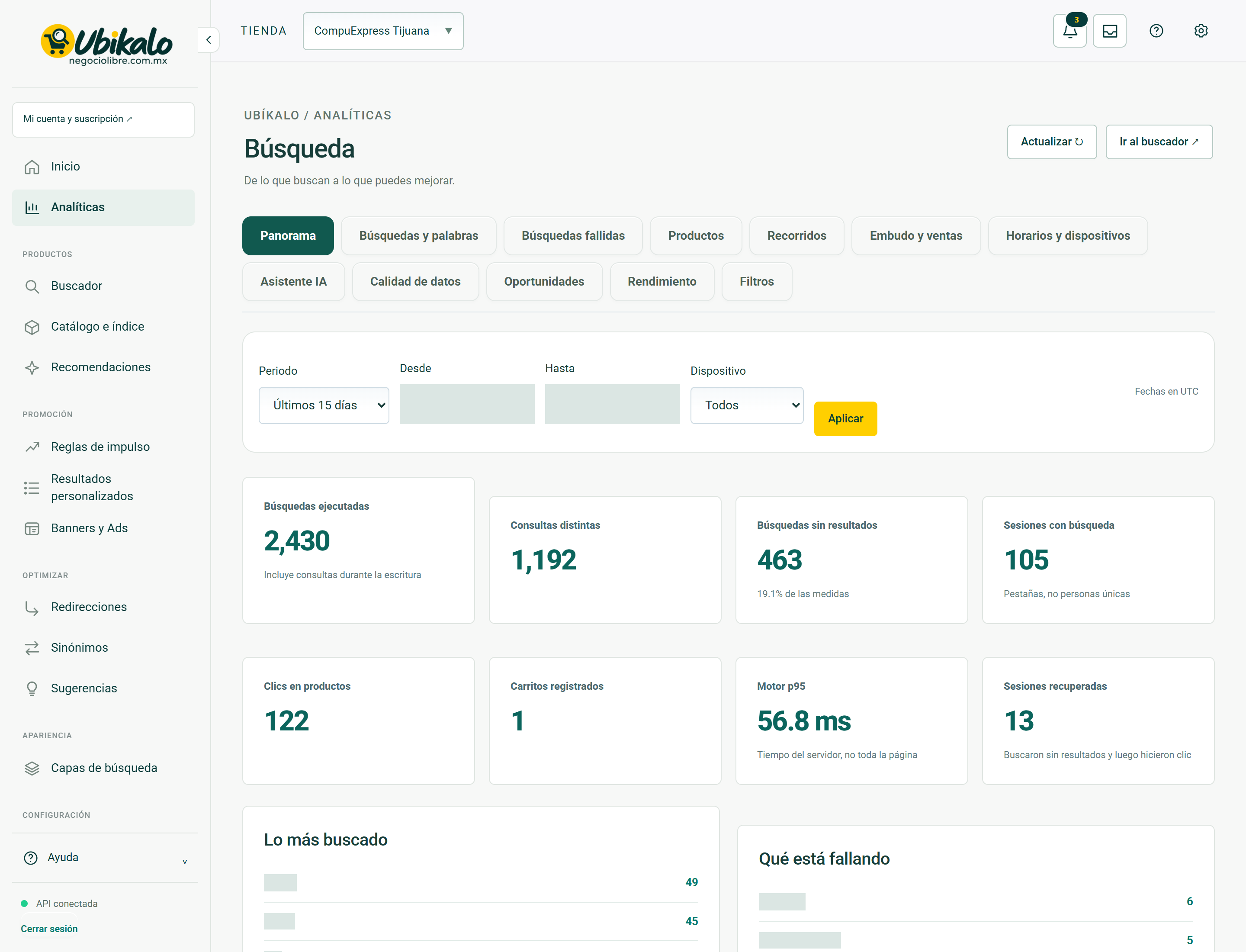
| Control | How to use | Effect |
|---|---|---|
| 1Select storeselect | Change the store or active site. Check this selector before saving, importing, or syncing. | data entryLocated in the actual interface |
| 2Notifications: 3 unreadbutton | Opens account context notices and its unread counter. A historical warning does not confirm a current failure. | ReadingLocated in the actual interface |
| 3inboxbutton | Open the account’s messages and notifications inbox. | NavigationLocated in the actual interface |
| 4MY ACCOUNT ↗to | Open account, sites or subscription management; It is not the editor of the search engine. | NavigationLocated in the actual interface |
| 5Activate dark modebutton | Toggle the visual theme and retain the browser preference. It does not modify content or commercial data. | Local preferenceLocated in the actual interface |
| 6Open administration panelto | Open global administration; requires explicit permission from NegocioLibre. | Browsing with permissionLocated in the actual interface |
| 7Update ↻button | Check the displayed data again. It is not a confirmation of sale nor a complete import. | ReadingLocated in the actual interface |
| 8Go to search engine ↗button | Open the search engine space to test real queries. | NavigationLocated in the actual interface |
| 9Panoramabutton | Open the “Panorama” section of the panel. Switching views is not a substitute for saving a pending form. | NavigationLocated in the actual interface |
| 10Searches and wordsbutton | Open the “Searches and words” section of the panel. Switching views is not a substitute for saving a pending form. | NavigationLocated in the actual interface |
| 11Failed searchesbutton | Open the “Failed Searches” section of the dashboard. Switching views is not a substitute for saving a pending form. | NavigationLocated in the actual interface |
| 12Productsbutton | Open the “Products” section of the dashboard. Switching views is not a substitute for saving a pending form. | NavigationLocated in the actual interface |
| 13Toursbutton | Open the “Tours” section of the panel. Switching views is not a substitute for saving a pending form. | NavigationLocated in the actual interface |
| 14Funnel and salesbutton | Open the “Funnel and Sales” section of the dashboard. Switching views is not a substitute for saving a pending form. | NavigationLocated in the actual interface |
| 15Schedules and devicesbutton | Open the “Schedules and Devices” section of the dashboard. Switching views is not a substitute for saving a pending form. | NavigationLocated in the actual interface |
| 16AI Assistantbutton | Open the “AI Assistant” section of the dashboard. Switching views is not a substitute for saving a pending form. | NavigationLocated in the actual interface |
| 17Data qualitybutton | Open the “Data Quality” section of the dashboard. Switching views is not a substitute for saving a pending form. | NavigationLocated in the actual interface |
| 18Opportunitiesbutton | Open the “Opportunities” section of the dashboard. Switching views is not a substitute for saving a pending form. | NavigationLocated in the actual interface |
| 19Performancebutton | Open the “Performance” section of the dashboard. Switching views is not a substitute for saving a pending form. | NavigationLocated in the actual interface |
| 20Filtersbutton | Open the “Filters” section of the panel. Switching views is not a substitute for saving a pending form. | NavigationLocated in the actual interface |
| 21Analytical periodselect | Select the reporting period. Review the resulting dates before comparing metrics. | data entryLocated in the actual interface |
| 22Sincedate | Defines the start date of the report. | data entryLocated in the actual interface |
| 23Untildate | Defines the end date; Please check the time zone indicated. | data entryLocated in the actual interface |
| 24Deviceselect | Limits the report to the selected device; It doesn’t change the store experience. | data entryLocated in the actual interface |
| 25Applybutton | Apply the period and filters of the report. Compare equivalent dates and check time zone. | ConsultationLocated in the actual interface |
Analytics · Searches and words 25 controls
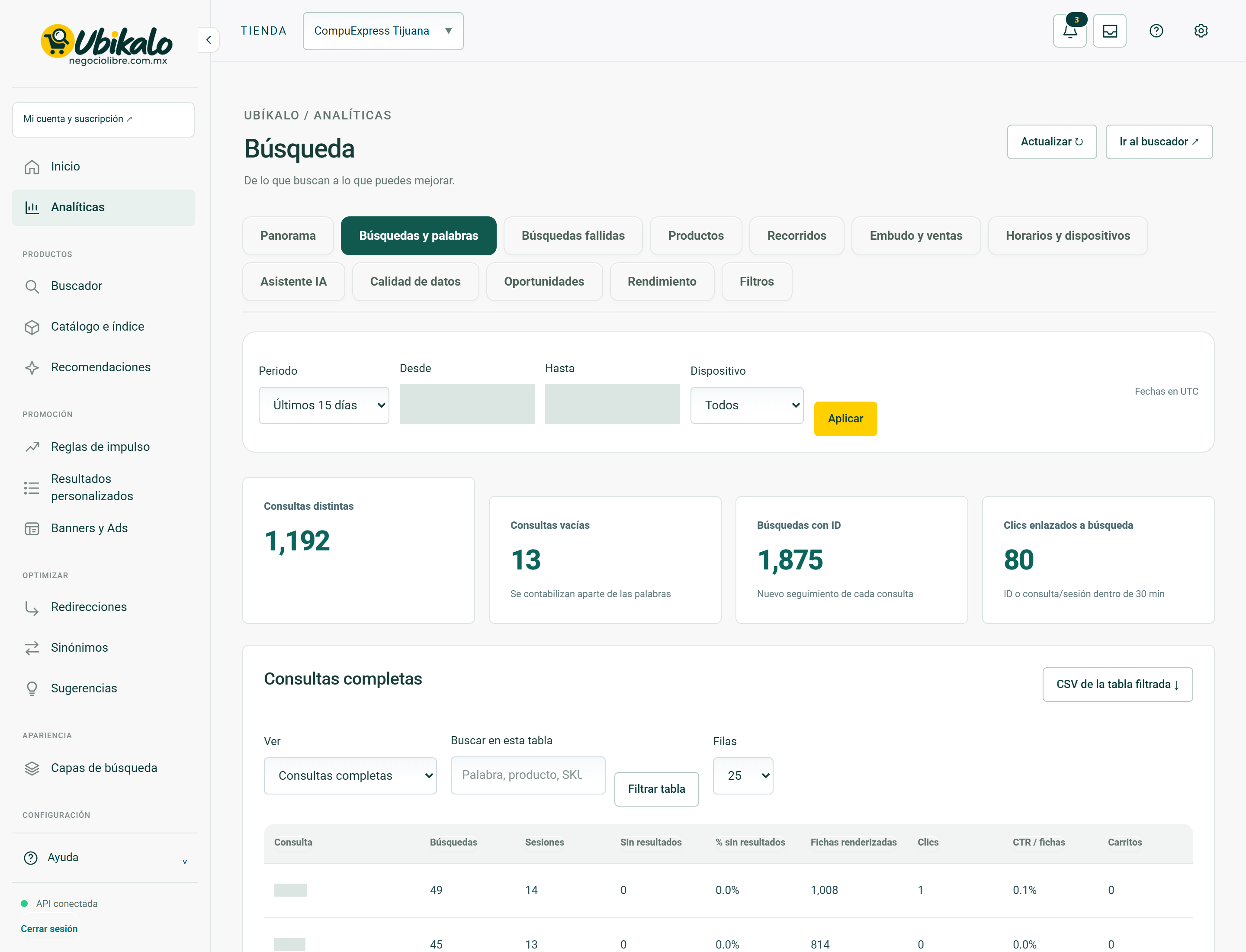
| Control | How to use | Effect |
|---|---|---|
| 1Select storeselect | Change the store or active site. Check this selector before saving, importing, or syncing. | data entryLocated in the actual interface |
| 2Notifications: 3 unreadbutton | Opens account context notices and its unread counter. A historical warning does not confirm a current failure. | ReadingLocated in the actual interface |
| 3inboxbutton | Open the account’s messages and notifications inbox. | NavigationLocated in the actual interface |
| 4MY ACCOUNT ↗to | Open account, sites or subscription management; It is not the editor of the search engine. | NavigationLocated in the actual interface |
| 5Activate dark modebutton | Toggle the visual theme and retain the browser preference. It does not modify content or commercial data. | Local preferenceLocated in the actual interface |
| 6Open administration panelto | Open global administration; requires explicit permission from NegocioLibre. | Browsing with permissionLocated in the actual interface |
| 7Update ↻button | Check the displayed data again. It is not a confirmation of sale nor a complete import. | ReadingLocated in the actual interface |
| 8Go to search engine ↗button | Open the search engine space to test real queries. | NavigationLocated in the actual interface |
| 9Panoramabutton | Open the “Panorama” section of the panel. Switching views is not a substitute for saving a pending form. | NavigationLocated in the actual interface |
| 10Searches and wordsbutton | Open the “Searches and words” section of the panel. Switching views is not a substitute for saving a pending form. | NavigationLocated in the actual interface |
| 11Failed searchesbutton | Open the “Failed Searches” section of the dashboard. Switching views is not a substitute for saving a pending form. | NavigationLocated in the actual interface |
| 12Productsbutton | Open the “Products” section of the dashboard. Switching views is not a substitute for saving a pending form. | NavigationLocated in the actual interface |
| 13Toursbutton | Open the “Tours” section of the panel. Switching views is not a substitute for saving a pending form. | NavigationLocated in the actual interface |
| 14Funnel and salesbutton | Open the “Funnel and Sales” section of the dashboard. Switching views is not a substitute for saving a pending form. | NavigationLocated in the actual interface |
| 15Schedules and devicesbutton | Open the “Schedules and Devices” section of the dashboard. Switching views is not a substitute for saving a pending form. | NavigationLocated in the actual interface |
| 16AI Assistantbutton | Open the “AI Assistant” section of the dashboard. Switching views is not a substitute for saving a pending form. | NavigationLocated in the actual interface |
| 17Data qualitybutton | Open the “Data Quality” section of the dashboard. Switching views is not a substitute for saving a pending form. | NavigationLocated in the actual interface |
| 18Opportunitiesbutton | Open the “Opportunities” section of the dashboard. Switching views is not a substitute for saving a pending form. | NavigationLocated in the actual interface |
| 19Performancebutton | Open the “Performance” section of the dashboard. Switching views is not a substitute for saving a pending form. | NavigationLocated in the actual interface |
| 20Filtersbutton | Open the “Filters” section of the panel. Switching views is not a substitute for saving a pending form. | NavigationLocated in the actual interface |
| 21Analytical periodselect | Select the reporting period. Review the resulting dates before comparing metrics. | data entryLocated in the actual interface |
| 22Sincedate | Defines the start date of the report. | data entryLocated in the actual interface |
| 23Untildate | Defines the end date; Please check the time zone indicated. | data entryLocated in the actual interface |
| 24Deviceselect | Limits the report to the selected device; It doesn’t change the store experience. | data entryLocated in the actual interface |
| 25Applybutton | Apply the period and filters of the report. Compare equivalent dates and check time zone. | ConsultationLocated in the actual interface |
Analytics · Failed searches 43 controls
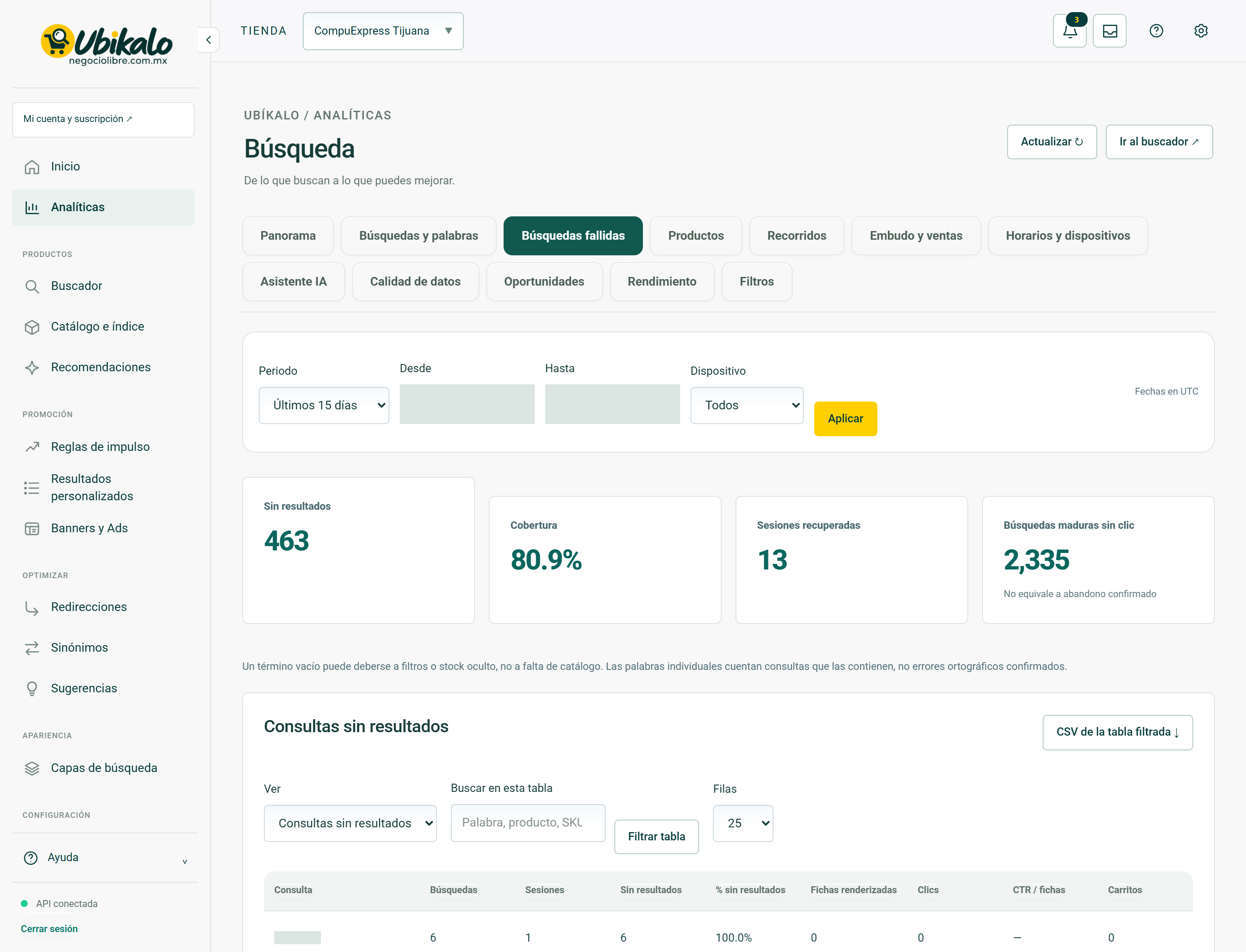
| Control | How to use | Effect |
|---|---|---|
| 1Select storeselect | Change the store or active site. Check this selector before saving, importing, or syncing. | data entryLocated in the actual interface |
| 2Notifications: 3 unreadbutton | Opens account context notices and its unread counter. A historical warning does not confirm a current failure. | ReadingLocated in the actual interface |
| 3inboxbutton | Open the account’s messages and notifications inbox. | NavigationLocated in the actual interface |
| 4MY ACCOUNT ↗to | Open account, sites or subscription management; It is not the editor of the search engine. | NavigationLocated in the actual interface |
| 5Activate dark modebutton | Toggle the visual theme and retain the browser preference. It does not modify content or commercial data. | Local preferenceLocated in the actual interface |
| 6Open administration panelto | Open global administration; requires explicit permission from NegocioLibre. | Browsing with permissionLocated in the actual interface |
| 7Update ↻button | Check the displayed data again. It is not a confirmation of sale nor a complete import. | ReadingLocated in the actual interface |
| 8Go to search engine ↗button | Open the search engine space to test real queries. | NavigationLocated in the actual interface |
| 9Panoramabutton | Open the “Panorama” section of the panel. Switching views is not a substitute for saving a pending form. | NavigationLocated in the actual interface |
| 10Searches and wordsbutton | Open the “Searches and words” section of the panel. Switching views is not a substitute for saving a pending form. | NavigationLocated in the actual interface |
| 11Failed searchesbutton | Open the “Failed Searches” section of the dashboard. Switching views is not a substitute for saving a pending form. | NavigationLocated in the actual interface |
| 12Productsbutton | Open the “Products” section of the dashboard. Switching views is not a substitute for saving a pending form. | NavigationLocated in the actual interface |
| 13Toursbutton | Open the “Tours” section of the panel. Switching views is not a substitute for saving a pending form. | NavigationLocated in the actual interface |
| 14Funnel and salesbutton | Open the “Funnel and Sales” section of the dashboard. Switching views is not a substitute for saving a pending form. | NavigationLocated in the actual interface |
| 15Schedules and devicesbutton | Open the “Schedules and Devices” section of the dashboard. Switching views is not a substitute for saving a pending form. | NavigationLocated in the actual interface |
| 16AI Assistantbutton | Open the “AI Assistant” section of the dashboard. Switching views is not a substitute for saving a pending form. | NavigationLocated in the actual interface |
| 17Data qualitybutton | Open the “Data Quality” section of the dashboard. Switching views is not a substitute for saving a pending form. | NavigationLocated in the actual interface |
| 18Opportunitiesbutton | Open the “Opportunities” section of the dashboard. Switching views is not a substitute for saving a pending form. | NavigationLocated in the actual interface |
| 19Performancebutton | Open the “Performance” section of the dashboard. Switching views is not a substitute for saving a pending form. | NavigationLocated in the actual interface |
| 20Filtersbutton | Open the “Filters” section of the panel. Switching views is not a substitute for saving a pending form. | NavigationLocated in the actual interface |
| 21Analytical periodselect | Select the reporting period. Review the resulting dates before comparing metrics. | data entryLocated in the actual interface |
| 22Sincedate | Defines the start date of the report. | data entryLocated in the actual interface |
| 23Untildate | Defines the end date; Please check the time zone indicated. | data entryLocated in the actual interface |
| 24Deviceselect | Limits the report to the selected device; It doesn’t change the store experience. | data entryLocated in the actual interface |
| 25Applybutton | Apply the period and filters of the report. Compare equivalent dates and check time zone. | ConsultationLocated in the actual interface |
| 26CSV of filtered table ↓button | Exports the available set of the report and its filters. It does not guarantee to export all historical events. Treat the file as business information. | ExportLocated in the actual interface |
| 27See Queries without results With tabs, without clicksselect | Select the current report data set; change the table, not the catalog. | ConsultationLocated in the actual interface |
| 28Search this tablesearch | Filters the information displayed by the text or criteria entered. Does not delete records. | data entryLocated in the actual interface |
| 29Filter tablebutton | Applies the table filter text. It does not delete records or change products. | ConsultationLocated in the actual interface |
| 30Rows 25 50 100select | Changes the number of visible rows in the table. It does not extend the historical retention of the report. | NavigationLocated in the actual interface |
| 31Consultationbutton | Sort the table by this column; repeat to change the direction if the interface allows it. | local orderLocated in the actual interface |
| 32Searchesbutton | Sort the table by this column; repeat to change the direction if the interface allows it. | local orderLocated in the actual interface |
| 33Sessionsbutton | Sort the table by this column; repeat to change the direction if the interface allows it. | local orderLocated in the actual interface |
| 34No resultsbutton | Sort the table by this column; repeat to change the direction if the interface allows it. | local orderLocated in the actual interface |
| 35% no resultsbutton | Sort the table by this column; repeat to change the direction if the interface allows it. | local orderLocated in the actual interface |
| 36Rendered tilesbutton | Sort the table by this column; repeat to change the direction if the interface allows it. | local orderLocated in the actual interface |
| 37Clicksbutton | Sort the table by this column; repeat to change the direction if the interface allows it. | local orderLocated in the actual interface |
| 38CTR/product pagesbutton | Sort the table by this column; repeat to change the direction if the interface allows it. | local orderLocated in the actual interface |
| 39Cartsbutton | Sort the table by this column; repeat to change the direction if the interface allows it. | local orderLocated in the actual interface |
| 40p95 engine (ms)button | Sort the table by this column; repeat to change the direction if the interface allows it. | local orderLocated in the actual interface |
| 41Open querybutton | Open the details of the selected query with its metrics. Does not execute a purchase. | ReadingLocated in the actual interface |
| 42Previousbutton | Changes the table page while preserving its context. It does not import or delete products. | NavigationLocated in the actual interface |
| 43Nextbutton | Changes the table page while preserving its context. It does not import or delete products. | NavigationLocated in the actual interface |
Analytics · Products 45 controls
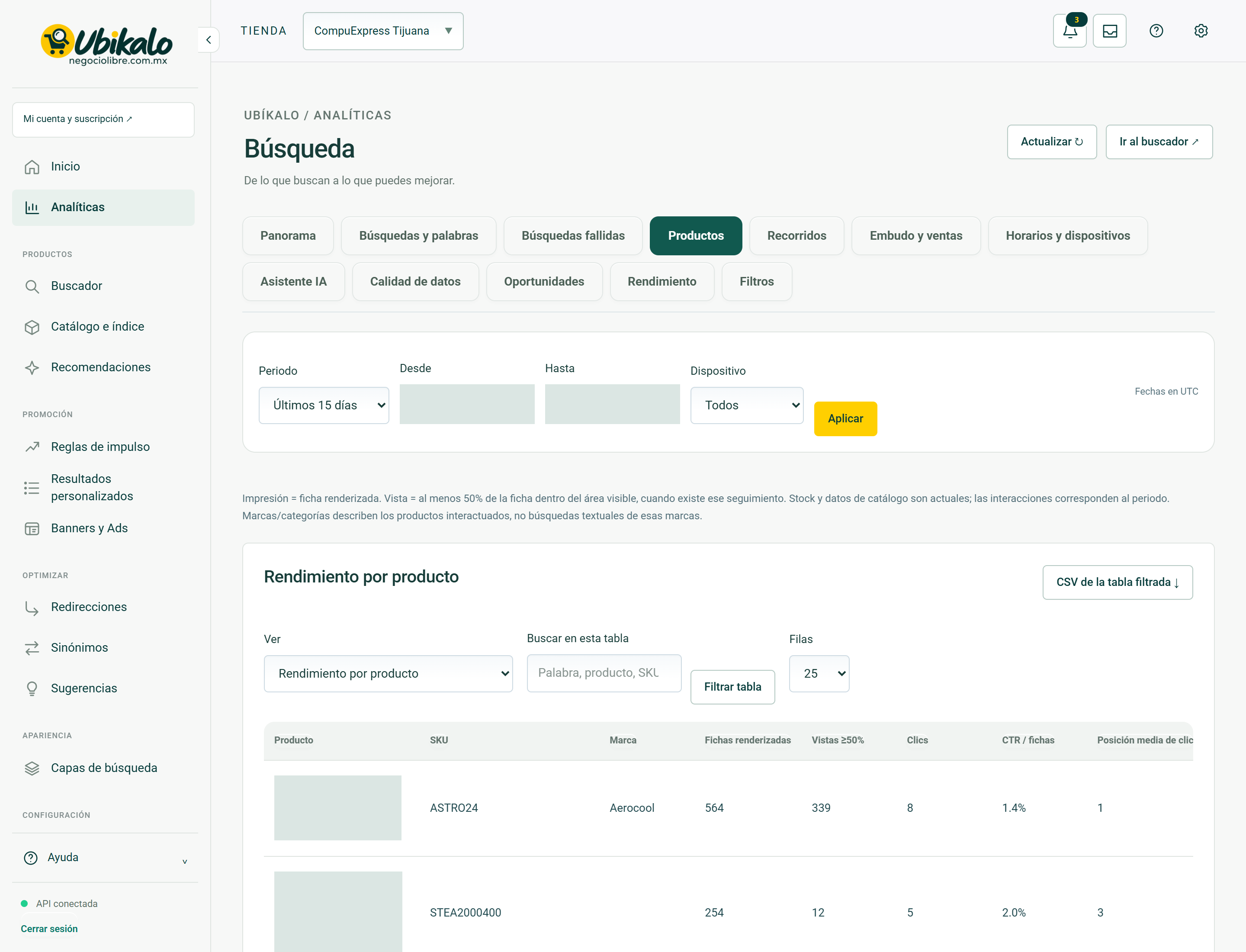
| Control | How to use | Effect |
|---|---|---|
| 1Select storeselect | Change the store or active site. Check this selector before saving, importing, or syncing. | data entryLocated in the actual interface |
| 2Notifications: 3 unreadbutton | Opens account context notices and its unread counter. A historical warning does not confirm a current failure. | ReadingLocated in the actual interface |
| 3inboxbutton | Open the account’s messages and notifications inbox. | NavigationLocated in the actual interface |
| 4MY ACCOUNT ↗to | Open account, sites or subscription management; It is not the editor of the search engine. | NavigationLocated in the actual interface |
| 5Activate dark modebutton | Toggle the visual theme and retain the browser preference. It does not modify content or commercial data. | Local preferenceLocated in the actual interface |
| 6Open administration panelto | Open global administration; requires explicit permission from NegocioLibre. | Browsing with permissionLocated in the actual interface |
| 7Update ↻button | Check the displayed data again. It is not a confirmation of sale nor a complete import. | ReadingLocated in the actual interface |
| 8Go to search engine ↗button | Open the search engine space to test real queries. | NavigationLocated in the actual interface |
| 9Panoramabutton | Open the “Panorama” section of the panel. Switching views is not a substitute for saving a pending form. | NavigationLocated in the actual interface |
| 10Searches and wordsbutton | Open the “Searches and words” section of the panel. Switching views is not a substitute for saving a pending form. | NavigationLocated in the actual interface |
| 11Failed searchesbutton | Open the “Failed Searches” section of the dashboard. Switching views is not a substitute for saving a pending form. | NavigationLocated in the actual interface |
| 12Productsbutton | Open the “Products” section of the dashboard. Switching views is not a substitute for saving a pending form. | NavigationLocated in the actual interface |
| 13Toursbutton | Open the “Tours” section of the panel. Switching views is not a substitute for saving a pending form. | NavigationLocated in the actual interface |
| 14Funnel and salesbutton | Open the “Funnel and Sales” section of the dashboard. Switching views is not a substitute for saving a pending form. | NavigationLocated in the actual interface |
| 15Schedules and devicesbutton | Open the “Schedules and Devices” section of the dashboard. Switching views is not a substitute for saving a pending form. | NavigationLocated in the actual interface |
| 16AI Assistantbutton | Open the “AI Assistant” section of the dashboard. Switching views is not a substitute for saving a pending form. | NavigationLocated in the actual interface |
| 17Data qualitybutton | Open the “Data Quality” section of the dashboard. Switching views is not a substitute for saving a pending form. | NavigationLocated in the actual interface |
| 18Opportunitiesbutton | Open the “Opportunities” section of the dashboard. Switching views is not a substitute for saving a pending form. | NavigationLocated in the actual interface |
| 19Performancebutton | Open the “Performance” section of the dashboard. Switching views is not a substitute for saving a pending form. | NavigationLocated in the actual interface |
| 20Filtersbutton | Open the “Filters” section of the panel. Switching views is not a substitute for saving a pending form. | NavigationLocated in the actual interface |
| 21Analytical periodselect | Select the reporting period. Review the resulting dates before comparing metrics. | data entryLocated in the actual interface |
| 22Sincedate | Defines the start date of the report. | data entryLocated in the actual interface |
| 23Untildate | Defines the end date; Please check the time zone indicated. | data entryLocated in the actual interface |
| 24Deviceselect | Limits the report to the selected device; It doesn’t change the store experience. | data entryLocated in the actual interface |
| 25Applybutton | Apply the period and filters of the report. Compare equivalent dates and check time zone. | ConsultationLocated in the actual interface |
| 26CSV of filtered table ↓button | Exports the available set of the report and its filters. It does not guarantee to export all historical events. Treat the file as business information. | ExportLocated in the actual interface |
| 27View Performance by product Brands of interacted products Categories of interacted products Click positionsselect | Select the current report data set; change the table, not the catalog. | ConsultationLocated in the actual interface |
| 28Search this tablesearch | Filters the information displayed by the text or criteria entered. Does not delete records. | data entryLocated in the actual interface |
| 29Filter tablebutton | Applies the table filter text. It does not delete records or change products. | ConsultationLocated in the actual interface |
| 30Rows 25 50 100select | Changes the number of visible rows in the table. It does not extend the historical retention of the report. | NavigationLocated in the actual interface |
| 31Productbutton | Sort the table by this column; repeat to change the direction if the interface allows it. | local orderLocated in the actual interface |
| 32SKUbutton | Sort the table by this column; repeat to change the direction if the interface allows it. | local orderLocated in the actual interface |
| 33Brandbutton | Sort the table by this column; repeat to change the direction if the interface allows it. | local orderLocated in the actual interface |
| 34Rendered tilesbutton | Sort the table by this column; repeat to change the direction if the interface allows it. | local orderLocated in the actual interface |
| 35Views ≥50%button | Sort the table by this column; repeat to change the direction if the interface allows it. | local orderLocated in the actual interface |
| 36Clicksbutton | Sort the table by this column; repeat to change the direction if the interface allows it. | local orderLocated in the actual interface |
| 37CTR/product pagesbutton | Sort the table by this column; repeat to change the direction if the interface allows it. | local orderLocated in the actual interface |
| 38Average click positionbutton | Sort the table by this column; repeat to change the direction if the interface allows it. | local orderLocated in the actual interface |
| 39Cartsbutton | Sort the table by this column; repeat to change the direction if the interface allows it. | local orderLocated in the actual interface |
| 40Online ordersbutton | Sort the table by this column; repeat to change the direction if the interface allows it. | local orderLocated in the actual interface |
| 41Unitsbutton | Sort the table by this column; repeat to change the direction if the interface allows it. | local orderLocated in the actual interface |
| 42Current stockbutton | Sort the table by this column; repeat to change the direction if the interface allows it. | local orderLocated in the actual interface |
| 43Open productbutton | Open the performance detail of the selected product. Do not edit your product page. | ReadingLocated in the actual interface |
| 44Previousbutton | Changes the table page while preserving its context. It does not import or delete products. | NavigationLocated in the actual interface |
| 45Nextbutton | Changes the table page while preserving its context. It does not import or delete products. | NavigationLocated in the actual interface |
Analytics · Tours 37 controls
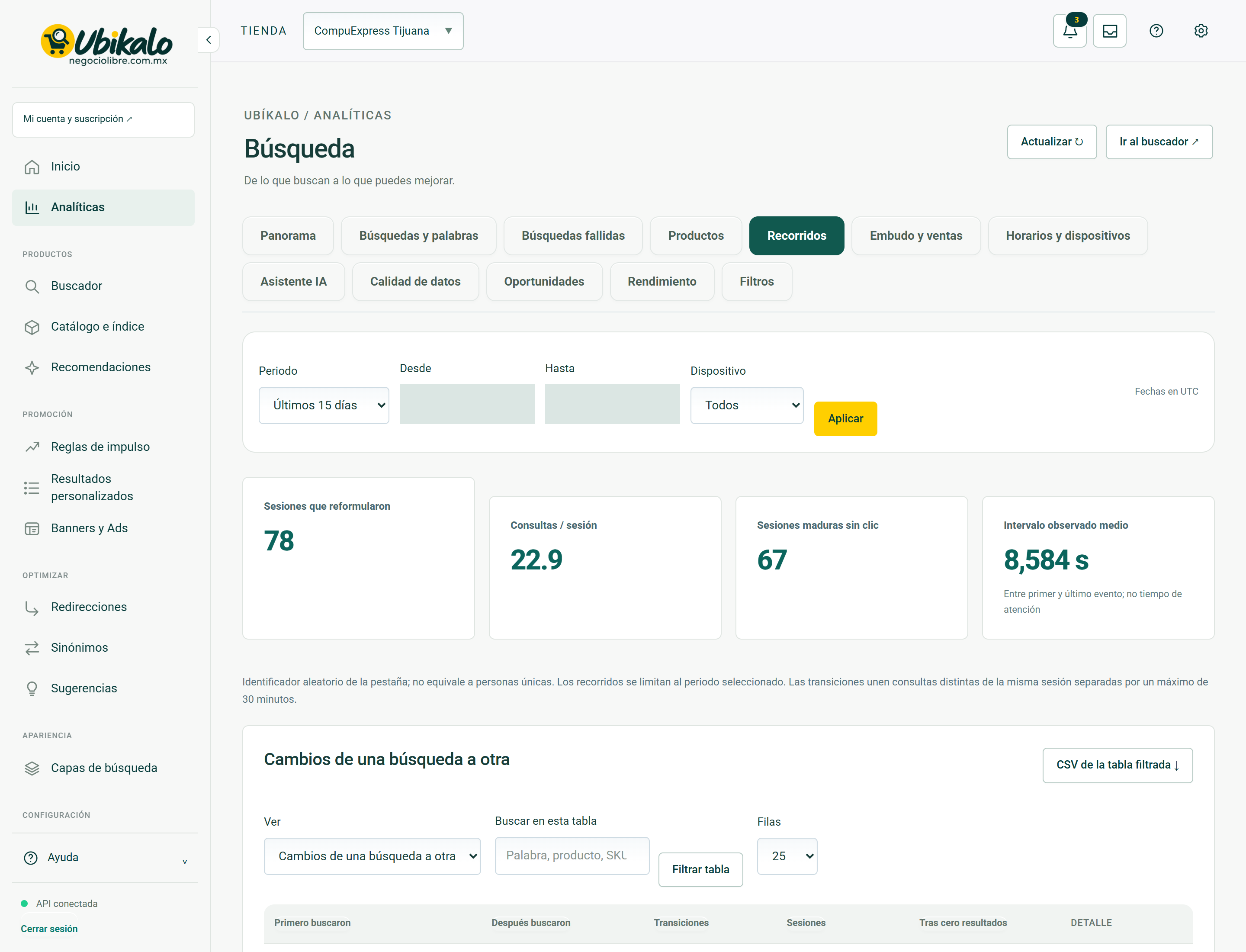
| Control | How to use | Effect |
|---|---|---|
| 1Select storeselect | Change the store or active site. Check this selector before saving, importing, or syncing. | data entryLocated in the actual interface |
| 2Notifications: 3 unreadbutton | Opens account context notices and its unread counter. A historical warning does not confirm a current failure. | ReadingLocated in the actual interface |
| 3inboxbutton | Open the account’s messages and notifications inbox. | NavigationLocated in the actual interface |
| 4MY ACCOUNT ↗to | Open account, sites or subscription management; It is not the editor of the search engine. | NavigationLocated in the actual interface |
| 5Activate dark modebutton | Toggle the visual theme and retain the browser preference. It does not modify content or commercial data. | Local preferenceLocated in the actual interface |
| 6Open administration panelto | Open global administration; requires explicit permission from NegocioLibre. | Browsing with permissionLocated in the actual interface |
| 7Update ↻button | Check the displayed data again. It is not a confirmation of sale nor a complete import. | ReadingLocated in the actual interface |
| 8Go to search engine ↗button | Open the search engine space to test real queries. | NavigationLocated in the actual interface |
| 9Panoramabutton | Open the “Panorama” section of the panel. Switching views is not a substitute for saving a pending form. | NavigationLocated in the actual interface |
| 10Searches and wordsbutton | Open the “Searches and words” section of the panel. Switching views is not a substitute for saving a pending form. | NavigationLocated in the actual interface |
| 11Failed searchesbutton | Open the “Failed Searches” section of the dashboard. Switching views is not a substitute for saving a pending form. | NavigationLocated in the actual interface |
| 12Productsbutton | Open the “Products” section of the dashboard. Switching views is not a substitute for saving a pending form. | NavigationLocated in the actual interface |
| 13Toursbutton | Open the “Tours” section of the panel. Switching views is not a substitute for saving a pending form. | NavigationLocated in the actual interface |
| 14Funnel and salesbutton | Open the “Funnel and Sales” section of the dashboard. Switching views is not a substitute for saving a pending form. | NavigationLocated in the actual interface |
| 15Schedules and devicesbutton | Open the “Schedules and Devices” section of the dashboard. Switching views is not a substitute for saving a pending form. | NavigationLocated in the actual interface |
| 16AI Assistantbutton | Open the “AI Assistant” section of the dashboard. Switching views is not a substitute for saving a pending form. | NavigationLocated in the actual interface |
| 17Data qualitybutton | Open the “Data Quality” section of the dashboard. Switching views is not a substitute for saving a pending form. | NavigationLocated in the actual interface |
| 18Opportunitiesbutton | Open the “Opportunities” section of the dashboard. Switching views is not a substitute for saving a pending form. | NavigationLocated in the actual interface |
| 19Performancebutton | Open the “Performance” section of the dashboard. Switching views is not a substitute for saving a pending form. | NavigationLocated in the actual interface |
| 20Filtersbutton | Open the “Filters” section of the panel. Switching views is not a substitute for saving a pending form. | NavigationLocated in the actual interface |
| 21Analytical periodselect | Select the reporting period. Review the resulting dates before comparing metrics. | data entryLocated in the actual interface |
| 22Sincedate | Defines the start date of the report. | data entryLocated in the actual interface |
| 23Untildate | Defines the end date; Please check the time zone indicated. | data entryLocated in the actual interface |
| 24Deviceselect | Limits the report to the selected device; It doesn’t change the store experience. | data entryLocated in the actual interface |
| 25Applybutton | Apply the period and filters of the report. Compare equivalent dates and check time zone. | ConsultationLocated in the actual interface |
| 26CSV of filtered table ↓button | Exports the available set of the report and its filters. It does not guarantee to export all historical events. Treat the file as business information. | ExportLocated in the actual interface |
| 27See Changes from one search to anotherselect | Select the current report data set; change the table, not the catalog. | ConsultationLocated in the actual interface |
| 28Search this tablesearch | Filters the information displayed by the text or criteria entered. Does not delete records. | data entryLocated in the actual interface |
| 29Filter tablebutton | Applies the table filter text. It does not delete records or change products. | ConsultationLocated in the actual interface |
| 30Rows 25 50 100select | Changes the number of visible rows in the table. It does not extend the historical retention of the report. | NavigationLocated in the actual interface |
| 31First they searchedbutton | Sort the table by this column; repeat to change the direction if the interface allows it. | local orderLocated in the actual interface |
| 32Then they searchedbutton | Sort the table by this column; repeat to change the direction if the interface allows it. | local orderLocated in the actual interface |
| 33Transitionsbutton | Sort the table by this column; repeat to change the direction if the interface allows it. | local orderLocated in the actual interface |
| 34Sessionsbutton | Sort the table by this column; repeat to change the direction if the interface allows it. | local orderLocated in the actual interface |
| 35After zero resultsbutton | Sort the table by this column; repeat to change the direction if the interface allows it. | local orderLocated in the actual interface |
| 36Previousbutton | Changes the table page while preserving its context. It does not import or delete products. | NavigationLocated in the actual interface |
| 37Nextbutton | Changes the table page while preserving its context. It does not import or delete products. | NavigationLocated in the actual interface |
Analytics · Funnel and sales 35 controls
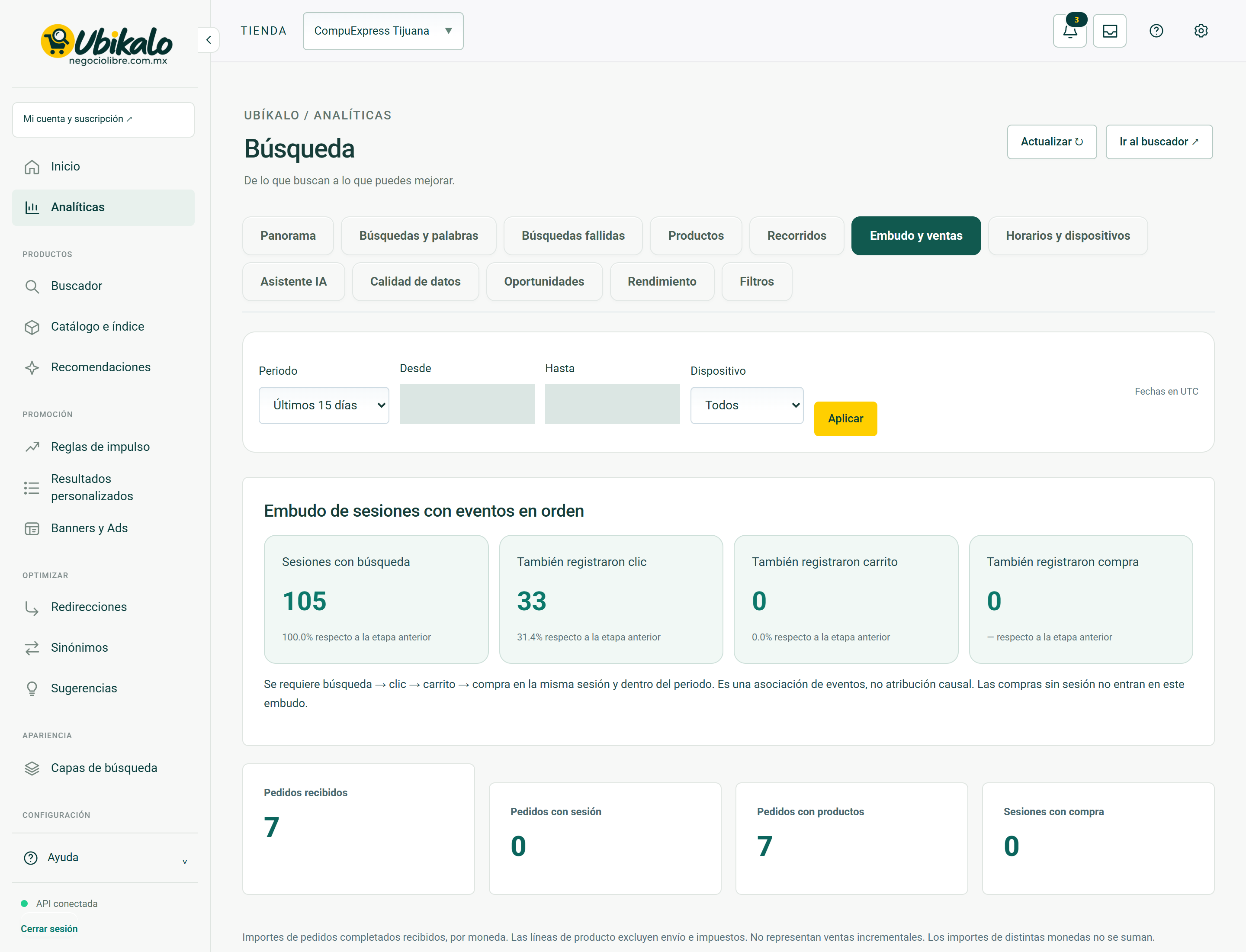
| Control | How to use | Effect |
|---|---|---|
| 1Select storeselect | Change the store or active site. Check this selector before saving, importing, or syncing. | data entryLocated in the actual interface |
| 2Notifications: 3 unreadbutton | Opens account context notices and its unread counter. A historical warning does not confirm a current failure. | ReadingLocated in the actual interface |
| 3inboxbutton | Open the account’s messages and notifications inbox. | NavigationLocated in the actual interface |
| 4MY ACCOUNT ↗to | Open account, sites or subscription management; It is not the editor of the search engine. | NavigationLocated in the actual interface |
| 5Activate dark modebutton | Toggle the visual theme and retain the browser preference. It does not modify content or commercial data. | Local preferenceLocated in the actual interface |
| 6Open administration panelto | Open global administration; requires explicit permission from NegocioLibre. | Browsing with permissionLocated in the actual interface |
| 7Update ↻button | Check the displayed data again. It is not a confirmation of sale nor a complete import. | ReadingLocated in the actual interface |
| 8Go to search engine ↗button | Open the search engine space to test real queries. | NavigationLocated in the actual interface |
| 9Panoramabutton | Open the “Panorama” section of the panel. Switching views is not a substitute for saving a pending form. | NavigationLocated in the actual interface |
| 10Searches and wordsbutton | Open the “Searches and words” section of the panel. Switching views is not a substitute for saving a pending form. | NavigationLocated in the actual interface |
| 11Failed searchesbutton | Open the “Failed Searches” section of the dashboard. Switching views is not a substitute for saving a pending form. | NavigationLocated in the actual interface |
| 12Productsbutton | Open the “Products” section of the dashboard. Switching views is not a substitute for saving a pending form. | NavigationLocated in the actual interface |
| 13Toursbutton | Open the “Tours” section of the panel. Switching views is not a substitute for saving a pending form. | NavigationLocated in the actual interface |
| 14Funnel and salesbutton | Open the “Funnel and Sales” section of the dashboard. Switching views is not a substitute for saving a pending form. | NavigationLocated in the actual interface |
| 15Schedules and devicesbutton | Open the “Schedules and Devices” section of the dashboard. Switching views is not a substitute for saving a pending form. | NavigationLocated in the actual interface |
| 16AI Assistantbutton | Open the “AI Assistant” section of the dashboard. Switching views is not a substitute for saving a pending form. | NavigationLocated in the actual interface |
| 17Data qualitybutton | Open the “Data Quality” section of the dashboard. Switching views is not a substitute for saving a pending form. | NavigationLocated in the actual interface |
| 18Opportunitiesbutton | Open the “Opportunities” section of the dashboard. Switching views is not a substitute for saving a pending form. | NavigationLocated in the actual interface |
| 19Performancebutton | Open the “Performance” section of the dashboard. Switching views is not a substitute for saving a pending form. | NavigationLocated in the actual interface |
| 20Filtersbutton | Open the “Filters” section of the panel. Switching views is not a substitute for saving a pending form. | NavigationLocated in the actual interface |
| 21Analytical periodselect | Select the reporting period. Review the resulting dates before comparing metrics. | data entryLocated in the actual interface |
| 22Sincedate | Defines the start date of the report. | data entryLocated in the actual interface |
| 23Untildate | Defines the end date; Please check the time zone indicated. | data entryLocated in the actual interface |
| 24Deviceselect | Limits the report to the selected device; It doesn’t change the store experience. | data entryLocated in the actual interface |
| 25Applybutton | Apply the period and filters of the report. Compare equivalent dates and check time zone. | ConsultationLocated in the actual interface |
| 26CSV of filtered table ↓button | Exports the available set of the report and its filters. It does not guarantee to export all historical events. Treat the file as business information. | ExportLocated in the actual interface |
| 27View Orders and Revenue by Currencyselect | Select the current report data set; change the table, not the catalog. | ConsultationLocated in the actual interface |
| 28Search this tablesearch | Filters the information displayed by the text or criteria entered. Does not delete records. | data entryLocated in the actual interface |
| 29Filter tablebutton | Applies the table filter text. It does not delete records or change products. | ConsultationLocated in the actual interface |
| 30Rows 25 50 100select | Changes the number of visible rows in the table. It does not extend the historical retention of the report. | NavigationLocated in the actual interface |
| 31Currencybutton | Sort the table by this column; repeat to change the direction if the interface allows it. | local orderLocated in the actual interface |
| 32Completed ordersbutton | Sort the table by this column; repeat to change the direction if the interface allows it. | local orderLocated in the actual interface |
| 33Order amountbutton | Sort the table by this column; repeat to change the direction if the interface allows it. | local orderLocated in the actual interface |
| 34Previousbutton | Changes the table page while preserving its context. It does not import or delete products. | NavigationLocated in the actual interface |
| 35Nextbutton | Changes the table page while preserving its context. It does not import or delete products. | NavigationLocated in the actual interface |
Analytics · Schedules and devices 41 controls
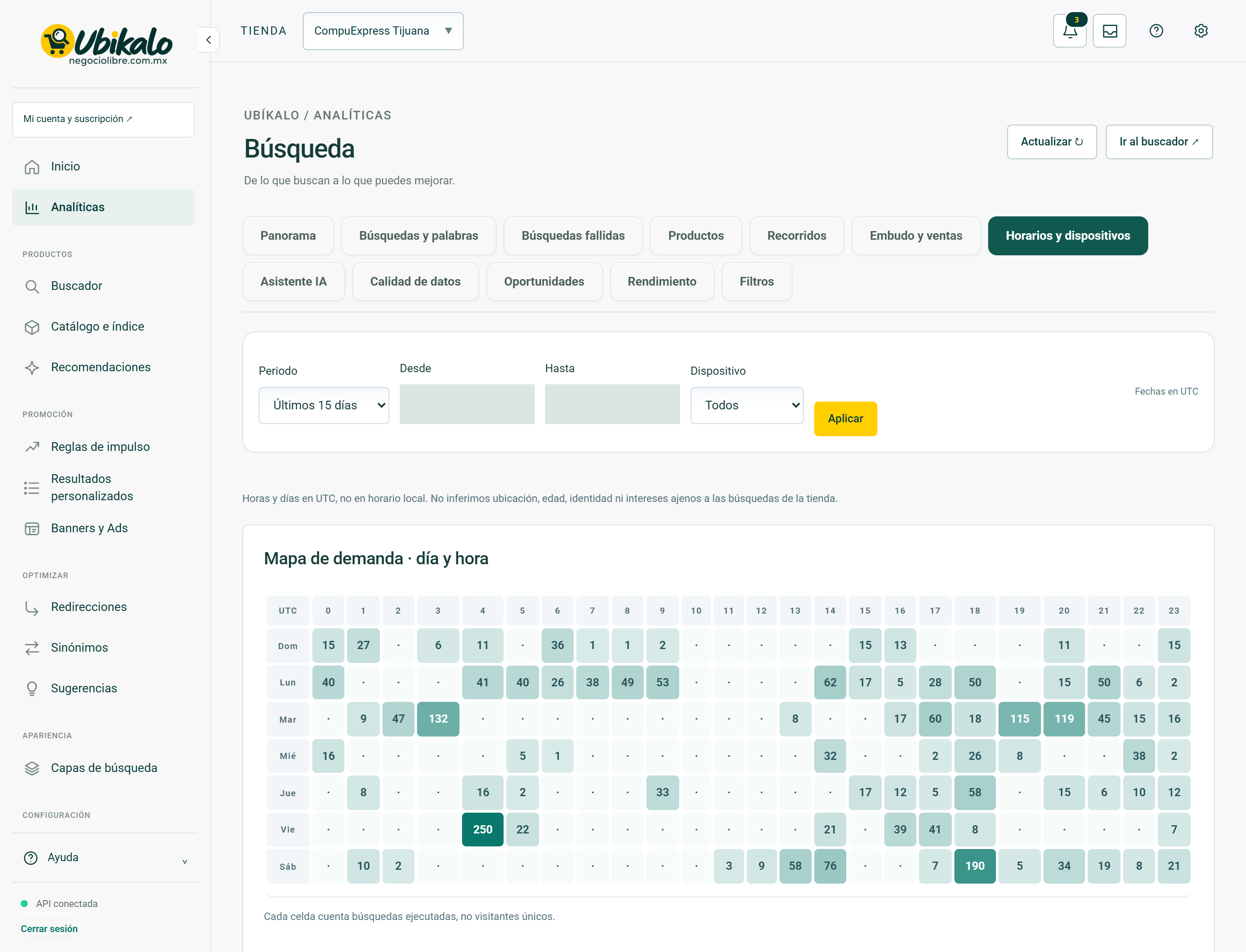
| Control | How to use | Effect |
|---|---|---|
| 1Select storeselect | Change the store or active site. Check this selector before saving, importing, or syncing. | data entryLocated in the actual interface |
| 2Notifications: 3 unreadbutton | Opens account context notices and its unread counter. A historical warning does not confirm a current failure. | ReadingLocated in the actual interface |
| 3inboxbutton | Open the account’s messages and notifications inbox. | NavigationLocated in the actual interface |
| 4MY ACCOUNT ↗to | Open account, sites or subscription management; It is not the editor of the search engine. | NavigationLocated in the actual interface |
| 5Activate dark modebutton | Toggle the visual theme and retain the browser preference. It does not modify content or commercial data. | Local preferenceLocated in the actual interface |
| 6Open administration panelto | Open global administration; requires explicit permission from NegocioLibre. | Browsing with permissionLocated in the actual interface |
| 7Update ↻button | Check the displayed data again. It is not a confirmation of sale nor a complete import. | ReadingLocated in the actual interface |
| 8Go to search engine ↗button | Open the search engine space to test real queries. | NavigationLocated in the actual interface |
| 9Panoramabutton | Open the “Panorama” section of the panel. Switching views is not a substitute for saving a pending form. | NavigationLocated in the actual interface |
| 10Searches and wordsbutton | Open the “Searches and words” section of the panel. Switching views is not a substitute for saving a pending form. | NavigationLocated in the actual interface |
| 11Failed searchesbutton | Open the “Failed Searches” section of the dashboard. Switching views is not a substitute for saving a pending form. | NavigationLocated in the actual interface |
| 12Productsbutton | Open the “Products” section of the dashboard. Switching views is not a substitute for saving a pending form. | NavigationLocated in the actual interface |
| 13Toursbutton | Open the “Tours” section of the panel. Switching views is not a substitute for saving a pending form. | NavigationLocated in the actual interface |
| 14Funnel and salesbutton | Open the “Funnel and Sales” section of the dashboard. Switching views is not a substitute for saving a pending form. | NavigationLocated in the actual interface |
| 15Schedules and devicesbutton | Open the “Schedules and Devices” section of the dashboard. Switching views is not a substitute for saving a pending form. | NavigationLocated in the actual interface |
| 16AI Assistantbutton | Open the “AI Assistant” section of the dashboard. Switching views is not a substitute for saving a pending form. | NavigationLocated in the actual interface |
| 17Data qualitybutton | Open the “Data Quality” section of the dashboard. Switching views is not a substitute for saving a pending form. | NavigationLocated in the actual interface |
| 18Opportunitiesbutton | Open the “Opportunities” section of the dashboard. Switching views is not a substitute for saving a pending form. | NavigationLocated in the actual interface |
| 19Performancebutton | Open the “Performance” section of the dashboard. Switching views is not a substitute for saving a pending form. | NavigationLocated in the actual interface |
| 20Filtersbutton | Open the “Filters” section of the panel. Switching views is not a substitute for saving a pending form. | NavigationLocated in the actual interface |
| 21Analytical periodselect | Select the reporting period. Review the resulting dates before comparing metrics. | data entryLocated in the actual interface |
| 22Sincedate | Defines the start date of the report. | data entryLocated in the actual interface |
| 23Untildate | Defines the end date; Please check the time zone indicated. | data entryLocated in the actual interface |
| 24Deviceselect | Limits the report to the selected device; It doesn’t change the store experience. | data entryLocated in the actual interface |
| 25Applybutton | Apply the period and filters of the report. Compare equivalent dates and check time zone. | ConsultationLocated in the actual interface |
| 26CSV of filtered table ↓button | Exports the available set of the report and its filters. It does not guarantee to export all historical events. Treat the file as business information. | ExportLocated in the actual interface |
| 27View Time of day (UTC) Day of week (UTC) Devices Interaction originselect | Select the current report data set; change the table, not the catalog. | ConsultationLocated in the actual interface |
| 28Search this tablesearch | Filters the information displayed by the text or criteria entered. Does not delete records. | data entryLocated in the actual interface |
| 29Filter tablebutton | Applies the table filter text. It does not delete records or change products. | ConsultationLocated in the actual interface |
| 30Rows 25 50 100select | Changes the number of visible rows in the table. It does not extend the historical retention of the report. | NavigationLocated in the actual interface |
| 31Time UTCbutton | Sort the table by this column; repeat to change the direction if the interface allows it. | local orderLocated in the actual interface |
| 32Searchesbutton | Sort the table by this column; repeat to change the direction if the interface allows it. | local orderLocated in the actual interface |
| 33Sessionsbutton | Sort the table by this column; repeat to change the direction if the interface allows it. | local orderLocated in the actual interface |
| 34No resultsbutton | Sort the table by this column; repeat to change the direction if the interface allows it. | local orderLocated in the actual interface |
| 35% no resultsbutton | Sort the table by this column; repeat to change the direction if the interface allows it. | local orderLocated in the actual interface |
| 36Rendered tilesbutton | Sort the table by this column; repeat to change the direction if the interface allows it. | local orderLocated in the actual interface |
| 37Clicksbutton | Sort the table by this column; repeat to change the direction if the interface allows it. | local orderLocated in the actual interface |
| 38CTR/product pagesbutton | Sort the table by this column; repeat to change the direction if the interface allows it. | local orderLocated in the actual interface |
| 39Cartsbutton | Sort the table by this column; repeat to change the direction if the interface allows it. | local orderLocated in the actual interface |
| 40Previousbutton | Changes the table page while preserving its context. It does not import or delete products. | NavigationLocated in the actual interface |
| 41Nextbutton | Changes the table page while preserving its context. It does not import or delete products. | NavigationLocated in the actual interface |
Analytics · AI Assistant 34 controls
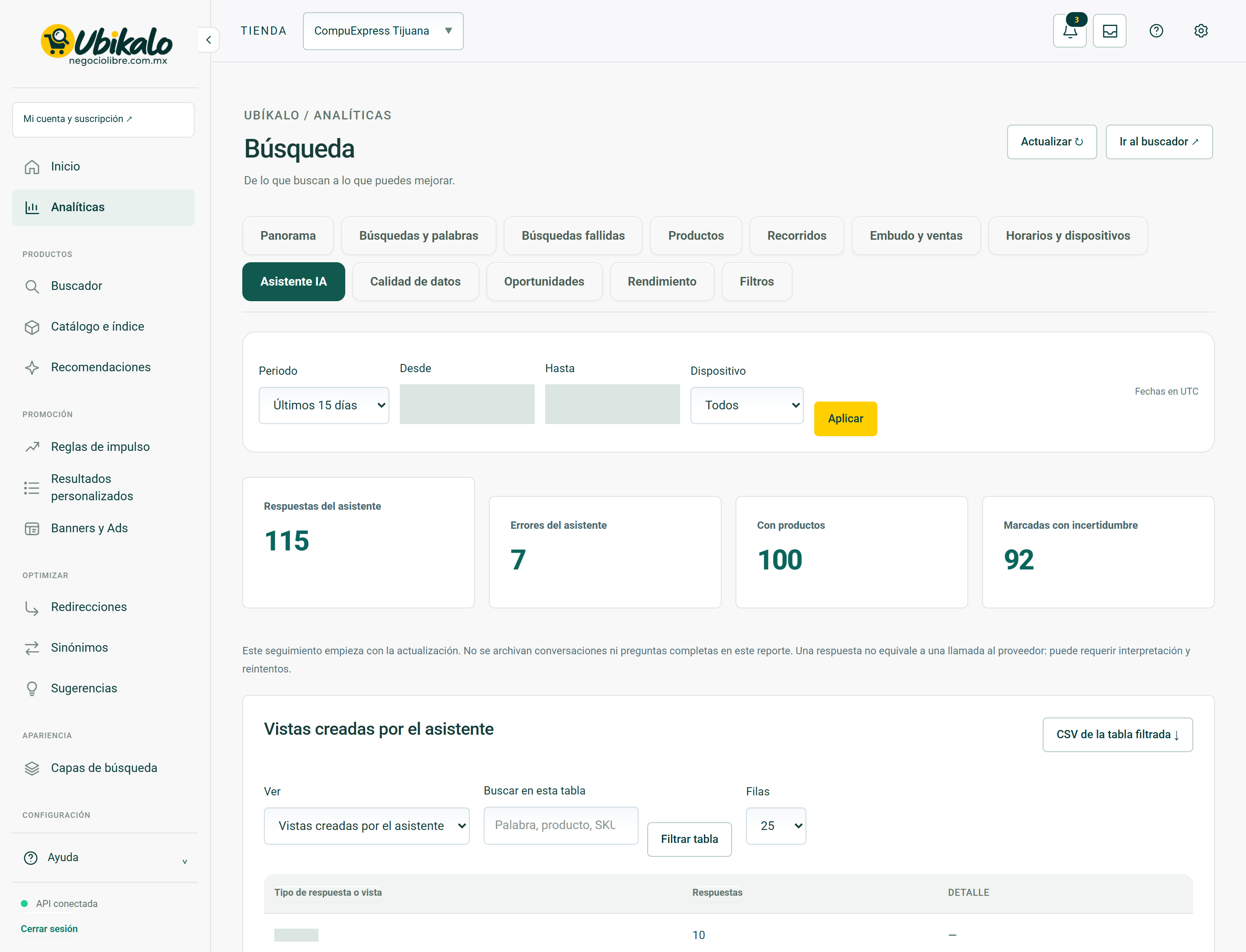
| Control | How to use | Effect |
|---|---|---|
| 1Select storeselect | Change the store or active site. Check this selector before saving, importing, or syncing. | data entryLocated in the actual interface |
| 2Notifications: 3 unreadbutton | Opens account context notices and its unread counter. A historical warning does not confirm a current failure. | ReadingLocated in the actual interface |
| 3inboxbutton | Open the account’s messages and notifications inbox. | NavigationLocated in the actual interface |
| 4MY ACCOUNT ↗to | Open account, sites or subscription management; It is not the editor of the search engine. | NavigationLocated in the actual interface |
| 5Activate dark modebutton | Toggle the visual theme and retain the browser preference. It does not modify content or commercial data. | Local preferenceLocated in the actual interface |
| 6Open administration panelto | Open global administration; requires explicit permission from NegocioLibre. | Browsing with permissionLocated in the actual interface |
| 7Update ↻button | Check the displayed data again. It is not a confirmation of sale nor a complete import. | ReadingLocated in the actual interface |
| 8Go to search engine ↗button | Open the search engine space to test real queries. | NavigationLocated in the actual interface |
| 9Panoramabutton | Open the “Panorama” section of the panel. Switching views is not a substitute for saving a pending form. | NavigationLocated in the actual interface |
| 10Searches and wordsbutton | Open the “Searches and words” section of the panel. Switching views is not a substitute for saving a pending form. | NavigationLocated in the actual interface |
| 11Failed searchesbutton | Open the “Failed Searches” section of the dashboard. Switching views is not a substitute for saving a pending form. | NavigationLocated in the actual interface |
| 12Productsbutton | Open the “Products” section of the dashboard. Switching views is not a substitute for saving a pending form. | NavigationLocated in the actual interface |
| 13Toursbutton | Open the “Tours” section of the panel. Switching views is not a substitute for saving a pending form. | NavigationLocated in the actual interface |
| 14Funnel and salesbutton | Open the “Funnel and Sales” section of the dashboard. Switching views is not a substitute for saving a pending form. | NavigationLocated in the actual interface |
| 15Schedules and devicesbutton | Open the “Schedules and Devices” section of the dashboard. Switching views is not a substitute for saving a pending form. | NavigationLocated in the actual interface |
| 16AI Assistantbutton | Open the “AI Assistant” section of the dashboard. Switching views is not a substitute for saving a pending form. | NavigationLocated in the actual interface |
| 17Data qualitybutton | Open the “Data Quality” section of the dashboard. Switching views is not a substitute for saving a pending form. | NavigationLocated in the actual interface |
| 18Opportunitiesbutton | Open the “Opportunities” section of the dashboard. Switching views is not a substitute for saving a pending form. | NavigationLocated in the actual interface |
| 19Performancebutton | Open the “Performance” section of the dashboard. Switching views is not a substitute for saving a pending form. | NavigationLocated in the actual interface |
| 20Filtersbutton | Open the “Filters” section of the panel. Switching views is not a substitute for saving a pending form. | NavigationLocated in the actual interface |
| 21Analytical periodselect | Select the reporting period. Review the resulting dates before comparing metrics. | data entryLocated in the actual interface |
| 22Sincedate | Defines the start date of the report. | data entryLocated in the actual interface |
| 23Untildate | Defines the end date; Please check the time zone indicated. | data entryLocated in the actual interface |
| 24Deviceselect | Limits the report to the selected device; It doesn’t change the store experience. | data entryLocated in the actual interface |
| 25Applybutton | Apply the period and filters of the report. Compare equivalent dates and check time zone. | ConsultationLocated in the actual interface |
| 26CSV of filtered table ↓button | Exports the available set of the report and its filters. It does not guarantee to export all historical events. Treat the file as business information. | ExportLocated in the actual interface |
| 27View Views created by the wizardselect | Select the current report data set; change the table, not the catalog. | ConsultationLocated in the actual interface |
| 28Search this tablesearch | Filters the information displayed by the text or criteria entered. Does not delete records. | data entryLocated in the actual interface |
| 29Filter tablebutton | Applies the table filter text. It does not delete records or change products. | ConsultationLocated in the actual interface |
| 30Rows 25 50 100select | Changes the number of visible rows in the table. It does not extend the historical retention of the report. | NavigationLocated in the actual interface |
| 31Response or view typebutton | Sort the table by this column; repeat to change the direction if the interface allows it. | local orderLocated in the actual interface |
| 32Answersbutton | Sort the table by this column; repeat to change the direction if the interface allows it. | local orderLocated in the actual interface |
| 33Previousbutton | Changes the table page while preserving its context. It does not import or delete products. | NavigationLocated in the actual interface |
| 34Nextbutton | Changes the table page while preserving its context. It does not import or delete products. | NavigationLocated in the actual interface |
Analytics · Data quality 34 controls
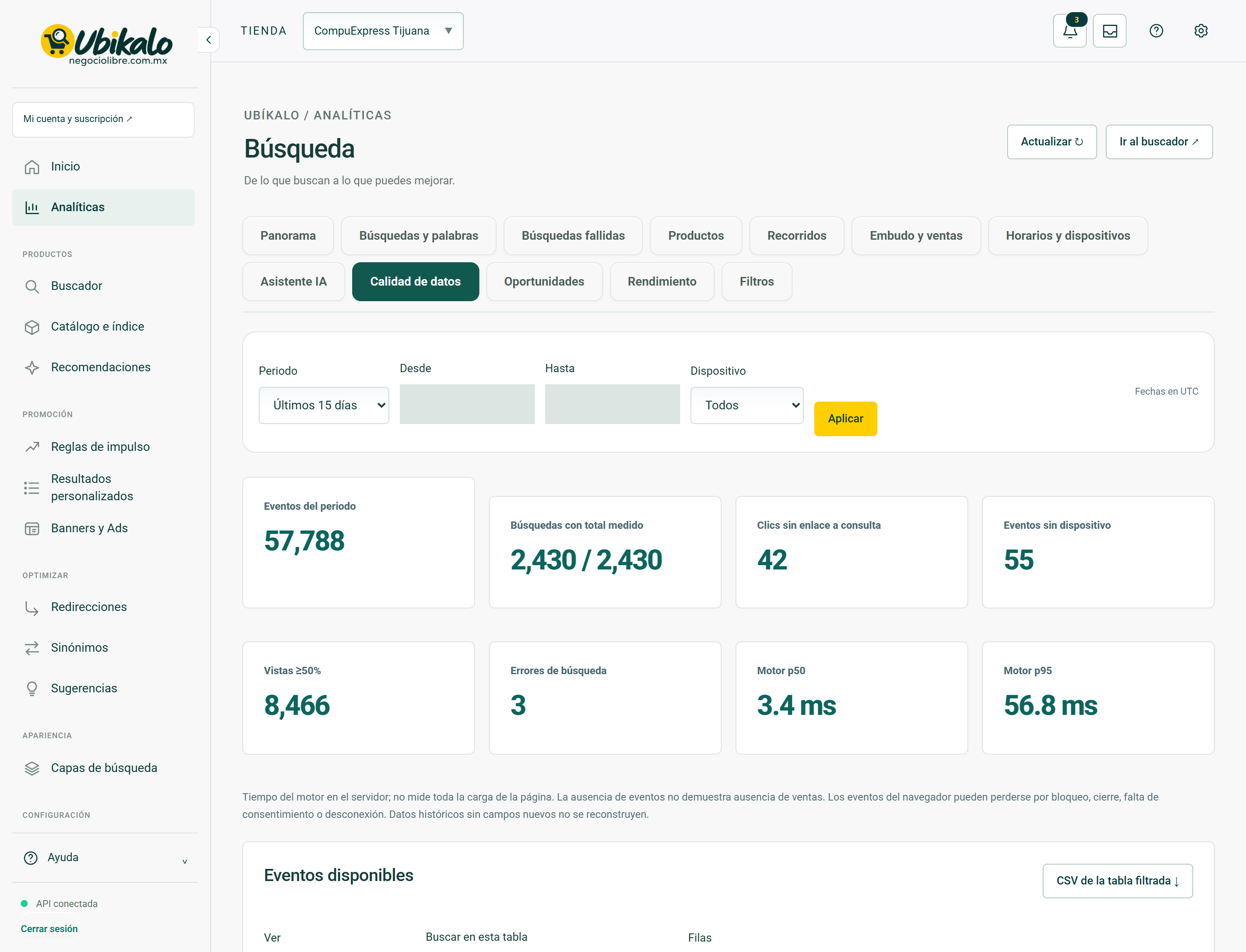
| Control | How to use | Effect |
|---|---|---|
| 1Select storeselect | Change the store or active site. Check this selector before saving, importing, or syncing. | data entryLocated in the actual interface |
| 2Notifications: 3 unreadbutton | Opens account context notices and its unread counter. A historical warning does not confirm a current failure. | ReadingLocated in the actual interface |
| 3inboxbutton | Open the account’s messages and notifications inbox. | NavigationLocated in the actual interface |
| 4MY ACCOUNT ↗to | Open account, sites or subscription management; It is not the editor of the search engine. | NavigationLocated in the actual interface |
| 5Activate dark modebutton | Toggle the visual theme and retain the browser preference. It does not modify content or commercial data. | Local preferenceLocated in the actual interface |
| 6Open administration panelto | Open global administration; requires explicit permission from NegocioLibre. | Browsing with permissionLocated in the actual interface |
| 7Update ↻button | Check the displayed data again. It is not a confirmation of sale nor a complete import. | ReadingLocated in the actual interface |
| 8Go to search engine ↗button | Open the search engine space to test real queries. | NavigationLocated in the actual interface |
| 9Panoramabutton | Open the “Panorama” section of the panel. Switching views is not a substitute for saving a pending form. | NavigationLocated in the actual interface |
| 10Searches and wordsbutton | Open the “Searches and words” section of the panel. Switching views is not a substitute for saving a pending form. | NavigationLocated in the actual interface |
| 11Failed searchesbutton | Open the “Failed Searches” section of the dashboard. Switching views is not a substitute for saving a pending form. | NavigationLocated in the actual interface |
| 12Productsbutton | Open the “Products” section of the dashboard. Switching views is not a substitute for saving a pending form. | NavigationLocated in the actual interface |
| 13Toursbutton | Open the “Tours” section of the panel. Switching views is not a substitute for saving a pending form. | NavigationLocated in the actual interface |
| 14Funnel and salesbutton | Open the “Funnel and Sales” section of the dashboard. Switching views is not a substitute for saving a pending form. | NavigationLocated in the actual interface |
| 15Schedules and devicesbutton | Open the “Schedules and Devices” section of the dashboard. Switching views is not a substitute for saving a pending form. | NavigationLocated in the actual interface |
| 16AI Assistantbutton | Open the “AI Assistant” section of the dashboard. Switching views is not a substitute for saving a pending form. | NavigationLocated in the actual interface |
| 17Data qualitybutton | Open the “Data Quality” section of the dashboard. Switching views is not a substitute for saving a pending form. | NavigationLocated in the actual interface |
| 18Opportunitiesbutton | Open the “Opportunities” section of the dashboard. Switching views is not a substitute for saving a pending form. | NavigationLocated in the actual interface |
| 19Performancebutton | Open the “Performance” section of the dashboard. Switching views is not a substitute for saving a pending form. | NavigationLocated in the actual interface |
| 20Filtersbutton | Open the “Filters” section of the panel. Switching views is not a substitute for saving a pending form. | NavigationLocated in the actual interface |
| 21Analytical periodselect | Select the reporting period. Review the resulting dates before comparing metrics. | data entryLocated in the actual interface |
| 22Sincedate | Defines the start date of the report. | data entryLocated in the actual interface |
| 23Untildate | Defines the end date; Please check the time zone indicated. | data entryLocated in the actual interface |
| 24Deviceselect | Limits the report to the selected device; It doesn’t change the store experience. | data entryLocated in the actual interface |
| 25Applybutton | Apply the period and filters of the report. Compare equivalent dates and check time zone. | ConsultationLocated in the actual interface |
| 26CSV of filtered table ↓button | Exports the available set of the report and its filters. It does not guarantee to export all historical events. Treat the file as business information. | ExportLocated in the actual interface |
| 27See Available Eventsselect | Select the current report data set; change the table, not the catalog. | ConsultationLocated in the actual interface |
| 28Search this tablesearch | Filters the information displayed by the text or criteria entered. Does not delete records. | data entryLocated in the actual interface |
| 29Filter tablebutton | Applies the table filter text. It does not delete records or change products. | ConsultationLocated in the actual interface |
| 30Rows 25 50 100select | Changes the number of visible rows in the table. It does not extend the historical retention of the report. | NavigationLocated in the actual interface |
| 31Event typebutton | Sort the table by this column; repeat to change the direction if the interface allows it. | local orderLocated in the actual interface |
| 32Eventsbutton | Sort the table by this column; repeat to change the direction if the interface allows it. | local orderLocated in the actual interface |
| 33Previousbutton | Changes the table page while preserving its context. It does not import or delete products. | NavigationLocated in the actual interface |
| 34Nextbutton | Changes the table page while preserving its context. It does not import or delete products. | NavigationLocated in the actual interface |
Analytics · Opportunities 34 controls
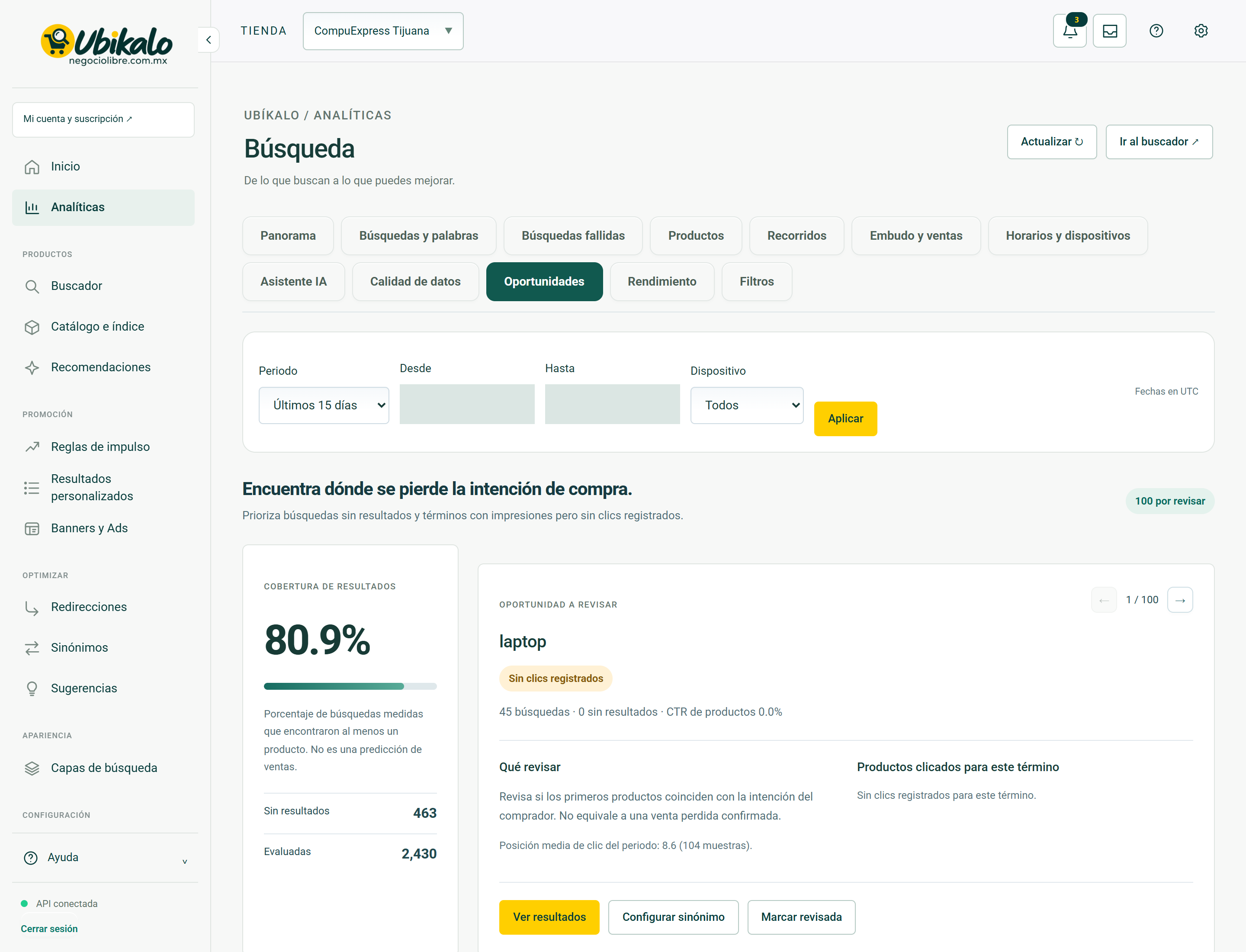
| Control | How to use | Effect |
|---|---|---|
| 1Select storeselect | Change the store or active site. Check this selector before saving, importing, or syncing. | data entryLocated in the actual interface |
| 2Notifications: 3 unreadbutton | Opens account context notices and its unread counter. A historical warning does not confirm a current failure. | ReadingLocated in the actual interface |
| 3inboxbutton | Open the account’s messages and notifications inbox. | NavigationLocated in the actual interface |
| 4MY ACCOUNT ↗to | Open account, sites or subscription management; It is not the editor of the search engine. | NavigationLocated in the actual interface |
| 5Activate dark modebutton | Toggle the visual theme and retain the browser preference. It does not modify content or commercial data. | Local preferenceLocated in the actual interface |
| 6Open administration panelto | Open global administration; requires explicit permission from NegocioLibre. | Browsing with permissionLocated in the actual interface |
| 7Update ↻button | Check the displayed data again. It is not a confirmation of sale nor a complete import. | ReadingLocated in the actual interface |
| 8Go to search engine ↗button | Open the search engine space to test real queries. | NavigationLocated in the actual interface |
| 9Panoramabutton | Open the “Panorama” section of the panel. Switching views is not a substitute for saving a pending form. | NavigationLocated in the actual interface |
| 10Searches and wordsbutton | Open the “Searches and words” section of the panel. Switching views is not a substitute for saving a pending form. | NavigationLocated in the actual interface |
| 11Failed searchesbutton | Open the “Failed Searches” section of the dashboard. Switching views is not a substitute for saving a pending form. | NavigationLocated in the actual interface |
| 12Productsbutton | Open the “Products” section of the dashboard. Switching views is not a substitute for saving a pending form. | NavigationLocated in the actual interface |
| 13Toursbutton | Open the “Tours” section of the panel. Switching views is not a substitute for saving a pending form. | NavigationLocated in the actual interface |
| 14Funnel and salesbutton | Open the “Funnel and Sales” section of the dashboard. Switching views is not a substitute for saving a pending form. | NavigationLocated in the actual interface |
| 15Schedules and devicesbutton | Open the “Schedules and Devices” section of the dashboard. Switching views is not a substitute for saving a pending form. | NavigationLocated in the actual interface |
| 16AI Assistantbutton | Open the “AI Assistant” section of the dashboard. Switching views is not a substitute for saving a pending form. | NavigationLocated in the actual interface |
| 17Data qualitybutton | Open the “Data Quality” section of the dashboard. Switching views is not a substitute for saving a pending form. | NavigationLocated in the actual interface |
| 18Opportunitiesbutton | Open the “Opportunities” section of the dashboard. Switching views is not a substitute for saving a pending form. | NavigationLocated in the actual interface |
| 19Performancebutton | Open the “Performance” section of the dashboard. Switching views is not a substitute for saving a pending form. | NavigationLocated in the actual interface |
| 20Filtersbutton | Open the “Filters” section of the panel. Switching views is not a substitute for saving a pending form. | NavigationLocated in the actual interface |
| 21Analytical periodselect | Select the reporting period. Review the resulting dates before comparing metrics. | data entryLocated in the actual interface |
| 22Sincedate | Defines the start date of the report. | data entryLocated in the actual interface |
| 23Untildate | Defines the end date; Please check the time zone indicated. | data entryLocated in the actual interface |
| 24Deviceselect | Limits the report to the selected device; It doesn’t change the store experience. | data entryLocated in the actual interface |
| 25Applybutton | Apply the period and filters of the report. Compare equivalent dates and check time zone. | ConsultationLocated in the actual interface |
| 26Previous opportunitybutton | Shows the previous opportunity. | NavigationLocated in the actual interface |
| 27Next opportunitybutton | Show the next opportunity. | NavigationLocated in the actual interface |
| 28See resultsbutton | Take the query to the search engine to check its results. | ConsultationLocated in the actual interface |
| 29Set synonymbutton | Open the synonym settings to correct the opportunity. The correction requires saving. | NavigationLocated in the actual interface |
| 30Mark revisedbutton | Mark the opportunity as reviewed. It does not correct the catalog or the relevance on its own. | Persistent changeLocated; not run in production |
| 31Download CSV ↓button | Download the indicated resource. Check product, domain and version before installing. | DownloadLocated in the actual interface |
| 32See results ↗button | Take the query to the search engine to check its results. | ConsultationLocated in the actual interface |
| 33Previousbutton | Changes the table page while preserving its context. It does not import or delete products. | NavigationLocated in the actual interface |
| 34Nextbutton | Changes the table page while preserving its context. It does not import or delete products. | NavigationLocated in the actual interface |
Analytics · Performance 29 controls
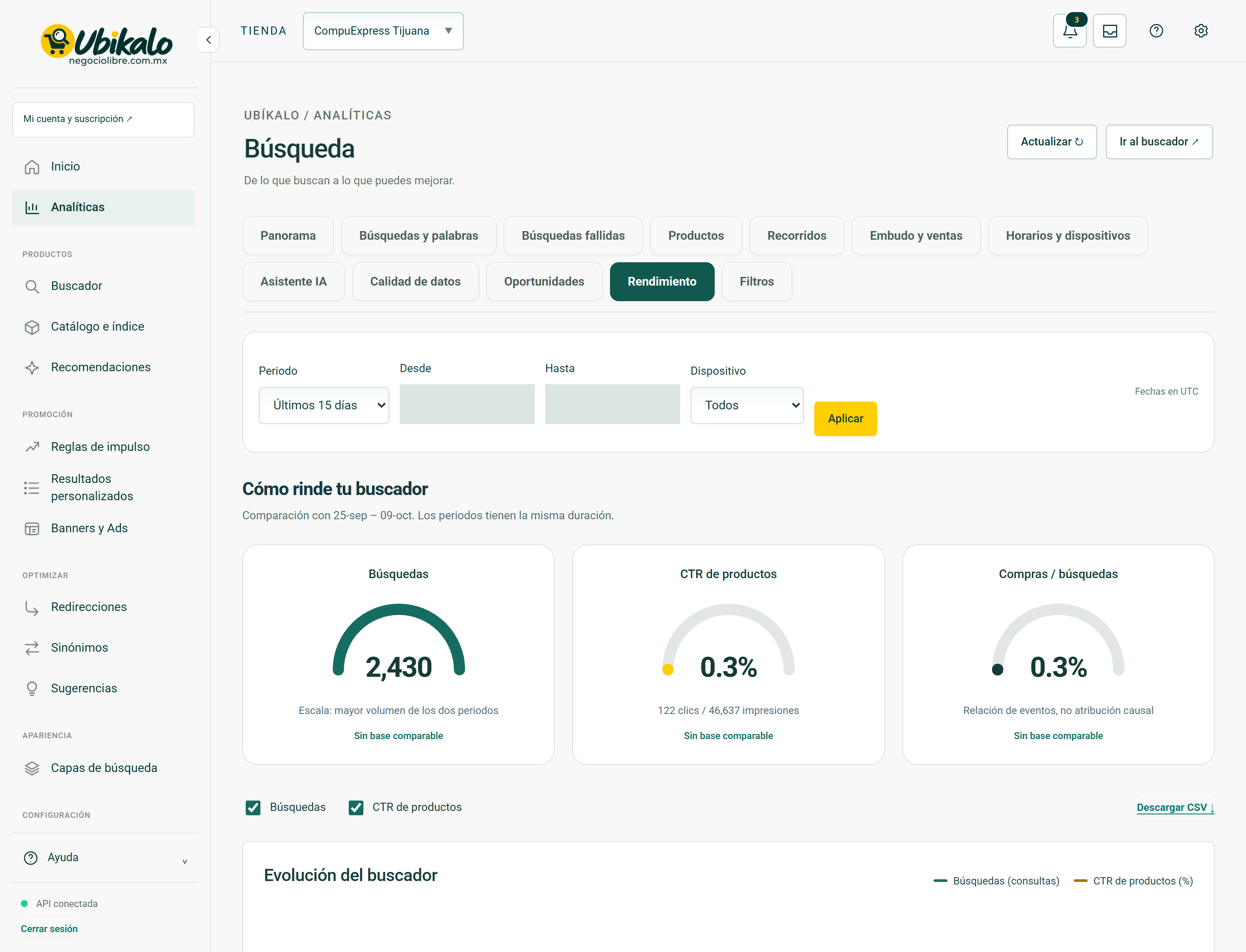
| Control | How to use | Effect |
|---|---|---|
| 1Select storeselect | Change the store or active site. Check this selector before saving, importing, or syncing. | data entryLocated in the actual interface |
| 2Notifications: 3 unreadbutton | Opens account context notices and its unread counter. A historical warning does not confirm a current failure. | ReadingLocated in the actual interface |
| 3inboxbutton | Open the account’s messages and notifications inbox. | NavigationLocated in the actual interface |
| 4MY ACCOUNT ↗to | Open account, sites or subscription management; It is not the editor of the search engine. | NavigationLocated in the actual interface |
| 5Activate dark modebutton | Toggle the visual theme and retain the browser preference. It does not modify content or commercial data. | Local preferenceLocated in the actual interface |
| 6Open administration panelto | Open global administration; requires explicit permission from NegocioLibre. | Browsing with permissionLocated in the actual interface |
| 7Update ↻button | Check the displayed data again. It is not a confirmation of sale nor a complete import. | ReadingLocated in the actual interface |
| 8Go to search engine ↗button | Open the search engine space to test real queries. | NavigationLocated in the actual interface |
| 9Panoramabutton | Open the “Panorama” section of the panel. Switching views is not a substitute for saving a pending form. | NavigationLocated in the actual interface |
| 10Searches and wordsbutton | Open the “Searches and words” section of the panel. Switching views is not a substitute for saving a pending form. | NavigationLocated in the actual interface |
| 11Failed searchesbutton | Open the “Failed Searches” section of the dashboard. Switching views is not a substitute for saving a pending form. | NavigationLocated in the actual interface |
| 12Productsbutton | Open the “Products” section of the dashboard. Switching views is not a substitute for saving a pending form. | NavigationLocated in the actual interface |
| 13Toursbutton | Open the “Tours” section of the panel. Switching views is not a substitute for saving a pending form. | NavigationLocated in the actual interface |
| 14Funnel and salesbutton | Open the “Funnel and Sales” section of the dashboard. Switching views is not a substitute for saving a pending form. | NavigationLocated in the actual interface |
| 15Schedules and devicesbutton | Open the “Schedules and Devices” section of the dashboard. Switching views is not a substitute for saving a pending form. | NavigationLocated in the actual interface |
| 16AI Assistantbutton | Open the “AI Assistant” section of the dashboard. Switching views is not a substitute for saving a pending form. | NavigationLocated in the actual interface |
| 17Data qualitybutton | Open the “Data Quality” section of the dashboard. Switching views is not a substitute for saving a pending form. | NavigationLocated in the actual interface |
| 18Opportunitiesbutton | Open the “Opportunities” section of the dashboard. Switching views is not a substitute for saving a pending form. | NavigationLocated in the actual interface |
| 19Performancebutton | Open the “Performance” section of the dashboard. Switching views is not a substitute for saving a pending form. | NavigationLocated in the actual interface |
| 20Filtersbutton | Open the “Filters” section of the panel. Switching views is not a substitute for saving a pending form. | NavigationLocated in the actual interface |
| 21Analytical periodselect | Select the reporting period. Review the resulting dates before comparing metrics. | data entryLocated in the actual interface |
| 22Sincedate | Defines the start date of the report. | data entryLocated in the actual interface |
| 23Untildate | Defines the end date; Please check the time zone indicated. | data entryLocated in the actual interface |
| 24Deviceselect | Limits the report to the selected device; It doesn’t change the store experience. | data entryLocated in the actual interface |
| 25Applybutton | Apply the period and filters of the report. Compare equivalent dates and check time zone. | ConsultationLocated in the actual interface |
| 26Searchescheckbox | Select the series that displays the performance graph. | ReadingLocated in the actual interface |
| 27Product CTRcheckbox | Select the series that displays the performance graph. | ReadingLocated in the actual interface |
| 28Download CSV ↓button | Download the indicated resource. Check product, domain and version before installing. | DownloadLocated in the actual interface |
| 29Consult daily data and definitionssummary | Open or close the information or the “Consult daily data and definitions” form. Does not send your data. | DropdownLocated in the actual interface |
Analytics · Filters 33 controls
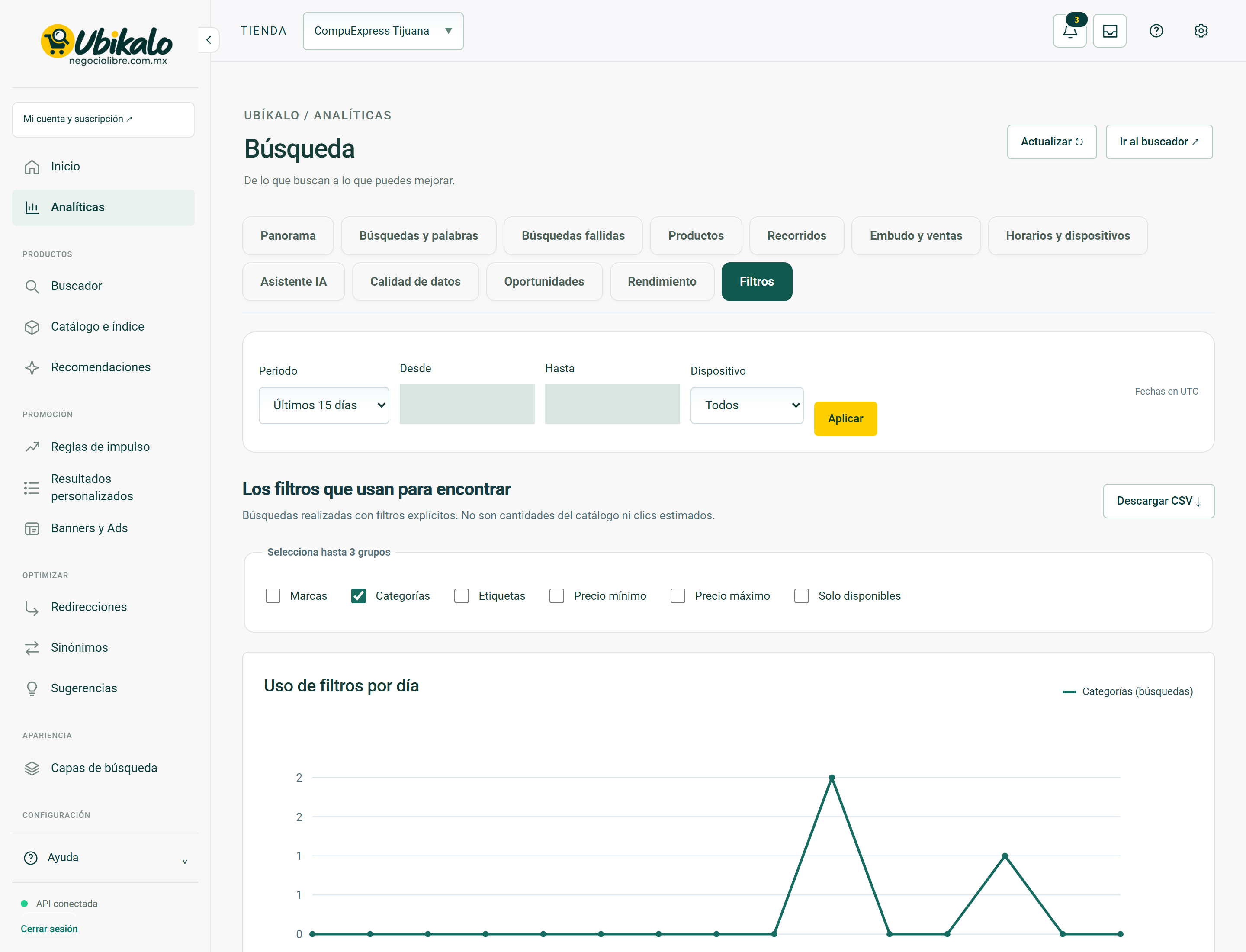
| Control | How to use | Effect |
|---|---|---|
| 1Select storeselect | Change the store or active site. Check this selector before saving, importing, or syncing. | data entryLocated in the actual interface |
| 2Notifications: 3 unreadbutton | Opens account context notices and its unread counter. A historical warning does not confirm a current failure. | ReadingLocated in the actual interface |
| 3inboxbutton | Open the account’s messages and notifications inbox. | NavigationLocated in the actual interface |
| 4MY ACCOUNT ↗to | Open account, sites or subscription management; It is not the editor of the search engine. | NavigationLocated in the actual interface |
| 5Activate dark modebutton | Toggle the visual theme and retain the browser preference. It does not modify content or commercial data. | Local preferenceLocated in the actual interface |
| 6Open administration panelto | Open global administration; requires explicit permission from NegocioLibre. | Browsing with permissionLocated in the actual interface |
| 7Update ↻button | Check the displayed data again. It is not a confirmation of sale nor a complete import. | ReadingLocated in the actual interface |
| 8Go to search engine ↗button | Open the search engine space to test real queries. | NavigationLocated in the actual interface |
| 9Panoramabutton | Open the “Panorama” section of the panel. Switching views is not a substitute for saving a pending form. | NavigationLocated in the actual interface |
| 10Searches and wordsbutton | Open the “Searches and words” section of the panel. Switching views is not a substitute for saving a pending form. | NavigationLocated in the actual interface |
| 11Failed searchesbutton | Open the “Failed Searches” section of the dashboard. Switching views is not a substitute for saving a pending form. | NavigationLocated in the actual interface |
| 12Productsbutton | Open the “Products” section of the dashboard. Switching views is not a substitute for saving a pending form. | NavigationLocated in the actual interface |
| 13Toursbutton | Open the “Tours” section of the panel. Switching views is not a substitute for saving a pending form. | NavigationLocated in the actual interface |
| 14Funnel and salesbutton | Open the “Funnel and Sales” section of the dashboard. Switching views is not a substitute for saving a pending form. | NavigationLocated in the actual interface |
| 15Schedules and devicesbutton | Open the “Schedules and Devices” section of the dashboard. Switching views is not a substitute for saving a pending form. | NavigationLocated in the actual interface |
| 16AI Assistantbutton | Open the “AI Assistant” section of the dashboard. Switching views is not a substitute for saving a pending form. | NavigationLocated in the actual interface |
| 17Data qualitybutton | Open the “Data Quality” section of the dashboard. Switching views is not a substitute for saving a pending form. | NavigationLocated in the actual interface |
| 18Opportunitiesbutton | Open the “Opportunities” section of the dashboard. Switching views is not a substitute for saving a pending form. | NavigationLocated in the actual interface |
| 19Performancebutton | Open the “Performance” section of the dashboard. Switching views is not a substitute for saving a pending form. | NavigationLocated in the actual interface |
| 20Filtersbutton | Open the “Filters” section of the panel. Switching views is not a substitute for saving a pending form. | NavigationLocated in the actual interface |
| 21Analytical periodselect | Select the reporting period. Review the resulting dates before comparing metrics. | data entryLocated in the actual interface |
| 22Sincedate | Defines the start date of the report. | data entryLocated in the actual interface |
| 23Untildate | Defines the end date; Please check the time zone indicated. | data entryLocated in the actual interface |
| 24Deviceselect | Limits the report to the selected device; It doesn’t change the store experience. | data entryLocated in the actual interface |
| 25Applybutton | Apply the period and filters of the report. Compare equivalent dates and check time zone. | ConsultationLocated in the actual interface |
| 26Download CSV ↓button | Download the indicated resource. Check product, domain and version before installing. | DownloadLocated in the actual interface |
| 27Brandscheckbox | Select the report filter to analyze that criterion. It doesn’t change what the store sells. | ConsultationLocated in the actual interface |
| 28Categoriescheckbox | Select the report filter to analyze that criterion. It doesn’t change what the store sells. | ConsultationLocated in the actual interface |
| 29Tagscheckbox | Select the report filter to analyze that criterion. It doesn’t change what the store sells. | ConsultationLocated in the actual interface |
| 30Minimum pricecheckbox | Select the report filter to analyze that criterion. It doesn’t change what the store sells. | ConsultationLocated in the actual interface |
| 31Maximum pricecheckbox | Select the report filter to analyze that criterion. It doesn’t change what the store sells. | ConsultationLocated in the actual interface |
| 32Only availablecheckbox | Select the report filter to analyze that criterion. It doesn’t change what the store sells. | ConsultationLocated in the actual interface |
| 33Check daily filter datasummary | Open or close the “Check daily filter data” information or form. Does not send your data. | DropdownLocated in the actual interface |
Steps
- Select the correct store or site in the header.
- Locate the control by its label in the capture and in the table.
- Check if its effect is read, local selection or persistent change before using it.
Before changing data
Check permissions and context. A snapshot documents the observed interface, it does not guarantee that all states, plans or integrations have the same controls. Hidden fields protect real data; They are not example information.
After using a control
In a save, review the confirmation and consult the data again. In a sync, it checks for completion and a sample of the result. Don’t interpret opening a form or copying code as a completed post.
How to verify it worked
The control produces the documented effect and preserves the correct context data and constraints.